Syai X1
X1 und Syai Tag-App nutzen
Lade von https://play.google.com/store/apps/details?id=com.syai.tag die APK herunter und installiere sie.
Starte den X1 Sensor
Wähle Syai Tag unter Konfigurations-Generator, BZ-Quelle aus.
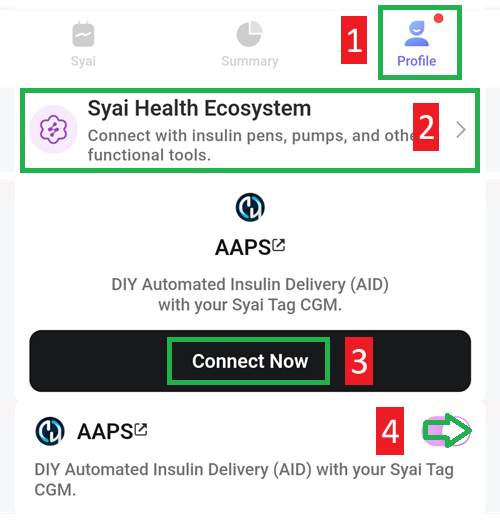
Aktiviere „Broadcast“ in der Syai-App:
Wähle „Profil“ aus
Syai Health Ecosystem
Tippe auf „Connect now with AAPS“, akzeptiere das „Third party data transfer agreement“
Aktiviere „Enable share data with AAPS“