Welcome to the AAPS documentation
Latest Release
31 באוקטובר 2026: גרסה 4.0.0 יצאה. Check the Release Notes to see what’s new and follow the instructions in the update manual to update.
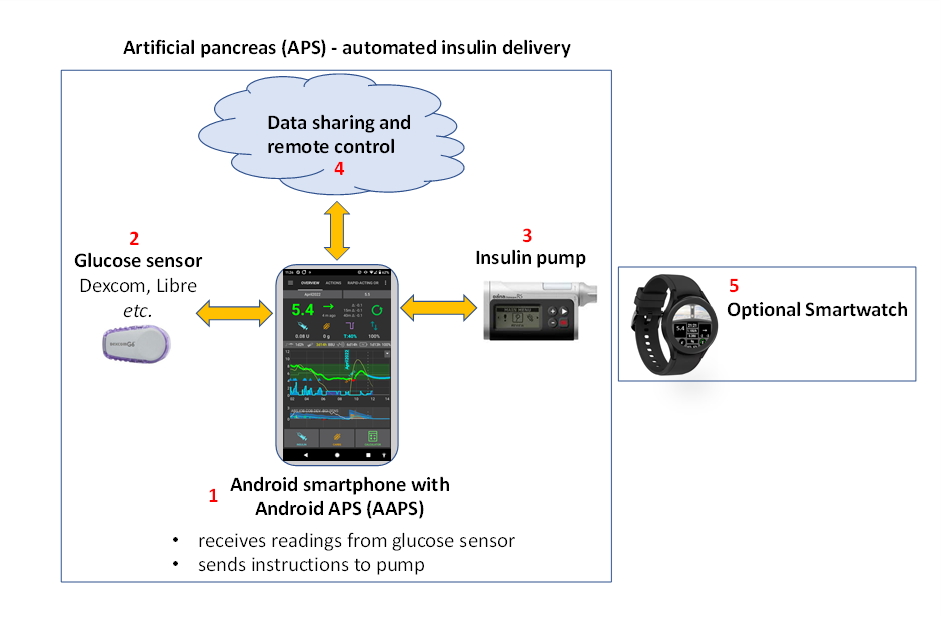
Android APS (AAPS) is an open source app for people living with insulin-dependent diabetes. It is an artificial pancreas system (APS) which runs on Android smartphones. AAPS uses an OpenAPS software algorithm and aims to do what a real pancreas does: keep blood sugar levels within healthy limits by using automated insulin dosing. כדי להשתמש ב־AAPS נדרשים שלושה מכשירים תואמים: (1) טלפון Android, (2) חיישן סוכר רציף (CGM) ו־(3) משאבת אינסולין בעלת אישור FDA/CE. אפשר להוסיף גם (4) שירותי ענן, כדי לשלוט ב־AAPS מרחוק, לשתף את הנתונים ולשמור אותם בשרת דיווח, וגם (5) שעון חכם.
תיעוד זה מסביר איך להגדיר את AAPS ואיך להשתמש בה. אפשר לנווט בתיעוד של AAPS דרך התפריט בצד (ובעזרת פונקציית החיפוש הנוחה Search docs), או דרך תוכן העניינים בתחתית הדף.
סקירה של תיעוד AAPS (”התיעוד“)
בפרק 1) תחילת העבודה, הדף מבוא ל-APS ול-AAPS מסביר את הרעיון הכללי: מה מערכת לבלב מלאכותי (APS) נועדה לעשות. It outlines the background of looping in general, why AAPS was developed, compares AAPS to other systems, and addresses safety. It gives suggestions about how to talk to your clinical team about AAPS, explains why you need to build the AAPS app yourself rather than just downloading it, and gives an overview of the typical connectivity of an AAPS system. It also addresses accessibility, and who is likely to benefit from AAPS.
הפרק מתכוננים להתחיל עם AAPS מפרט יותר על שיקולי הבטיחות ועל הטלפונים, חיישני הסוכר הרציפים (CGM) ומשאבות האינסולין התואמים ל־AAPS. It gives an overview of the process you will go through, and provides an approximate timeline for gaining full functionality of AAPS. This section gets you technically prepared to assemble your AAPS setup as quickly and efficiently as possible. תת־הפרק מערכות CGM תואמות מסביר איך לשפר את הגדרת ה־CGM ואילו אפשרויות החלקה הן הטובות ביותר.
Now that you have a solid understanding of the process, you can start assembling your AAPS loop.
פרק 2) בניית האפליקציה מסביר למה צריך לבנות את אפליקציית AAPS בעצמכם ולא פשוט להוריד אותה. הוא מוביל אתכם צעד אחר צעד בבניית האפליקציה (בדפדפן, ב־Android Studio או משורת הפקודה), ואחר כך בהעברה ובהתקנה שלה בטלפון. הפרק מתחיל בשלב שאינו חובה: יצירת חשבון Google ייעודי לשמירת הבניות והגיבויים. הוא מסביר גם את אימות המפתחים ב־Android, שינוי ש־Google מכניסה החל מספטמבר 2026, והוא משפיע על אופן ההתקנה של אפליקציות שבניתם בעצמכם.
פרק 3) הגדרת שרת הדיווח עוסק בבחירה ובהגדרה של שרת הדיווח (Nightscout או Tidepool), כדי שתוכלו לעבור על הנתונים שלכם ולשתף אותם.
פרק 4) הגדרת AAPS עוסק בהגדרת אפליקציית AAPS בעזרת אשף ההתקנה, בחיבור שלה לאפליקציית ה־CGM ולמשאבת אינסולין אמיתית או וירטואלית, וגם בחיבור AAPS לשרת הדיווח. אחר כך תכירו את כל מה ש־AAPS יכולה לעשות, בתהליך בטוח, צעד אחר צעד ובקצב זהיר. כך ניתן לוודא שאתם (או הילד שלכם) מכירים היטב את כל הרמות ואת הגדרות התפריטים ומרגישים בנוח איתם, לפני המעבר לשלב הבא, שנקרא בדרך כלל ”המשימה“ הבאה. ממשיכים כך עד שצוברים מספיק ניסיון כדי להתחיל להשתמש באפשרויות המתקדמות יותר באפליקציה. These Objectives are specially designed in such a way that will gradually unlock more possibilities of AAPS and switch from Open Loop to Closed Loop.
פרק 5) חיי היומיום עם AAPS מציג את התכונות המרכזיות של AAPS, כדי לעזור לכם להשתמש ב־AAPS ולהתאים אותה לצרכים שלכם. זה כולל הבנה של המסכים, פחמימות פעילות (COB), רגישות, DynamicISF, החלפת פרופיל, יעדים זמניים, פחמימות ממושכות (eCarbs), אוטומציות וסקירת הנתונים שלכם בדפדפן ההיסטוריה ובסטטיסטיקה. הפרק עוסק גם בנושאים נפוצים, כמו איך להתמודד עם סוגים שונים של ארוחות, איך לטפל בהחלפת צינורית ובהחלפת חיישן, עדכוני טלפון, מעבר לשעון קיץ, נסיעות עם AAPS וספורט. שאלות ותשובות נפוצות מופיעות בפרק פתרון התקלות.
פרק 6) תכונות AAPS מרחוק מציג את אחת החוזקות האמיתיות של AAPS. There are a wide range of possibilities for remotely sending commands to, or simply following the data from AAPS. This is equally useful for carers who want to use AAPS for minors, and for adults with diabetes who either want to monitor their sugars (and other metrics) more conveniently than just on their phone (on a watch, in the car etc.), or wish to have significant others to also monitor the data. This section also provides guidance for using Android Auto so you can view glucose levels in the car.
פרק 7) שעונים חכמים עם Wear OS נותן מידע והוראות לשימוש בשעון חכם עם Android Wear OS, עם פני השעון הייעודיים של AAPS או עם פני שעון מותאמים אישית, כשלט רחוק לטלפון או רק כתצוגה.
פרק 8) תחזוקת AAPS מסביר איך לייצא ולגבות את ההגדרות (חשוב מאוד למקרה שהטלפון אובד או נשבר), מציג את הערות הגרסה האחרונה, מפרט איך לעדכן את AAPS ומסביר מה קורה כשגרסה מגיעה לסוף התמיכה. You can expect that there will be one new version and 2-3 required updates per year. You are required to do these updates as with all software, as any minor bugs are ironed out, and improvements to AAPS are made. קיים סעיף ייעודי לפתרון תקלות בעדכון, ובו השאלות הנפוצות.
פרק 9) עזרה ופתרון תקלות מכוון אתכם למקומות הטובים ביותר לקבלת עזרה כללית עם AAPS. זה המקום היחיד שאליו פונים כשמשהו לא עובד: הדף פתרון תקלות מרכז לפי נושאים את הפתרונות לבעיות הנפוצות ביותר, והדף שאלות נפוצות עונה על שאלות שחוזרות הרבה. This is very important so that you can get in touch with others as quickly as possible, clarify questions and solve the usual pitfalls. A lot of people are already using AAPS successfully, but everyone has a question at some point that they couldn’t solve on their own. Due to the large number of users, the response times to questions are usually very quick, typically only a few hours. Don’t worry about asking for help, there is no such thing as a dumb question! We encourage users of any/all levels of experience to ask as many questions as they feel is necessary to help get them up and running safely. פרק זה כולל פתרון תקלות כללי עבור AAPS ועבור AAPSClient, אפליקציה נלווית למעקב. הוא גם מסביר כיצד לשלוח את נתוני AAPS, כלומר קובצי היומן, למפתחים לצורך בדיקה אם לדעתכם יש בעיה טכנית ב־AAPS שדורשת בירור.
פרק 10) עוסק ב**אפשרויות AAPS מתקדמות**, למשל איך לעבור משימוש ב־AAPS כלולאה סגורה היברידית (עם בולוס לארוחות וכו«) ללולאה סגורה מלאה (בלי בולוס), איך לכוונן את הפרופיל ולהשתמש ב־Autotune, ומפרט את מצב הפיתוח ואת מצב ההנדסה. Most users get on just fine with the main or ”Master“ AAPS version without looking into these options, this section is for users who already have good control and are looking to further improve their setup.
בפרק 11) איך לתמוך ב־AAPS אנחנו נותנים מידע שיעזור לכם לתמוך בפרויקט הזה. You can donate money, equipment or expertise. ניתן להציע שינויים בתיעוד או לערוך אותו בעצמכם, לסייע בתרגום התיעוד ולשתף את הנתונים שלכם באמצעות פרויקט Open Humans.
פרק 12) מקורות מידע כולל תיעוד נוסף או מאורכב, ובו תת־פרק עבור צוותים רפואיים שמתעניינים בטכנולוגיית לבלב מלאכותי בקוד פתוח כמו AAPS, או עבור מטופלים שרוצים לשתף מידע כזה עם הצוות הרפואי שלהם. גם המבוא עוסק בנושא הזה. More diabetes and looping references and resources are also contained in this section. הוא כולל את מילון המונחים, רשימה של ראשי התיבות (או השמות המקוצרים) שמופיעים לאורך AAPS. This is where to go to find out what the terms ISF or TT, stand for, for example.
Interested in getting started with AAPS? קראו עוד על AAPS במבוא ל-APS ול-AAPS.
SAFETY NOTICE
The safety of AAPS relies on the safety features of your hardware (phone, pump, CGM). Only use a fully functioning FDA/CE approved insulin pump and CGM. Do not use broken, modified or self-built insulin pumps or CGM receivers. Only use original consumable supplies (inserters, cannulas and insulin reservoirs) approved by the manufacturer for use with your pump and CGM. Using untested or modified supplies can cause inaccuracy and insulin dosing errors, resulting in significant risk to the user.
Do not use AAPS if you take SGLT-2 inhibitors (gliflozins), as they lower blood sugar levels. קיים סיכון מוגבר לחמצת קטוטית סוכרתית (DKA) עקב מתן אינסולין מופחת, ולהיפוגליקמיה עקב ירידה ברמות הסוכר בדם.
Disclaimer
All information and code described here is for informational and educational purposes only. Use Nightscout and AAPS at your own risk, and do not use the information or code to make medical decisions. Nightscout כרגע אינו מנסה לעמוד בדרישות הפרטיות של HIPAA.
Use of code from github.com is without warranty or formal support of any kind. פרטים נוספים בקובץ LICENSE של מאגר זה.
All product and company names, trademarks, servicemarks, registered trademarks, and registered servicemarks are the property of their respective holders. השימוש בהם הוא למטרות מידע בלבד, ואינו מרמז על קשר כלשהו איתם או על המלצה מצדם.
ל־AAPS אין קשר לחברות הבאות, והן אינן ממליצות עליה: SOOIL, Dexcom, Accu-Chek, Roche Diabetes Care, Insulet, Medtronic, Diaconn, EOFlow, MicroTech Medical (Equil), Medtrum, Senseonics (Eversense), i-SENS (CareSens), POCTech, Ottai או Syai.
AAPS Documentation Index
Using this documentation
1) תחילת העבודה
- מבוא ל-APS ול-AAPS
- What is an “Artificial Pancreas System”?
- What does hybrid closed loop mean?
- How and why did looping start?
- מהו Android APS (AAPS)?
- What are the basic components of AAPS?
- What are the advantages of the AAPS system?
- Specific advantages include:
- 1) Safety built-in
- 2) גמישות בחומרה
- 3) התאמה אישית רחבה, עם טווחי הגדרות רחבים
- 4) ניטור מרחוק
- 5) שליטה מרחוק
- 6) אין מגבלות מסחריות, בזכות ממשקי תוכנה פתוחים
- 7) ממשק אפליקציה מפורט
- 8) נגישות ועלות סבירה
- 9) תמיכה
- 10) צפיות, שקיפות ובטיחות
- 11) גישה לתכונות מתקדמות דרך גרסאות פיתוח (dev), כולל לולאה סגורה מלאה
- 12) אפשרות לתרום בעצמכם לשיפורים נוספים
- Specific advantages include:
- How does AAPS compare to MDI and open looping?
- How does AAPS compare to other looping systems?
- האם AAPS משתמש בבינה מלאכותית או באלגוריתם לומד?
- איזו מערכת מתאימה לי או למי שאני מטפל/ת בו?
- Is it safe to use open-source systems like AAPS?
- How can I approach discussing AAPS with my clinical team?
- מדוע אי אפשר פשוט להוריד את AAPS ולהשתמש בו מיד?
- What is the connectivity of the AAPS system?
- כיצד AAPS ממשיך להתפתח ולהשתפר?
- Who can benefit from AAPS?
- מתכוננים להתחיל עם AAPS
- סקירת רכיבים
- - משאבות תואמות
- - מערכות CGM תואמות
- - טלפונים
- - שעונים חכמים ו־AAPS
2) בניית האפליקציה
- חשבון Google ייעודי ל-AAPS (לא חובה)
- How to set up a dedicated Google account for AAPS
- עברו ל־https://myaccount.google.com
- Enter your NEW dedicated account details:
- Enter your persona:
- Choose your NEW email address & password
- הזינו מספר טלפון שיכול לקבל את הודעת ה־SMS לאימות
- Enter the recovery email address
- Finish setting up the account
- Customize the new profile display
- Open the Gmail website on both windows to configure the new account
- In the new Gmail account (bottom window), open Gmail settings…
- Setup forwarding…
- Verify the forwarded email address
- Archive forwarded emails in the new dedicated Gmail account (bottom window)
- How to set up a dedicated Google account for AAPS
- בניית AAPS
- - בנייה בדפדפן
- - בנייה ב-Android Studio
- - הוראות בנייה משורת הפקודה
- העברה והתקנה של AAPS בטלפון החכם
3) הגדרת שרת הדיווח
4) הגדרת AAPS
- אשף ההתקנה של AAPS
- פרופיל AAPS שלכם
- ביצוע שינויים בתצורת AAPS שלכם
- - הגדרות תצורה (Config Builder)
- - הגדרות
- השלמת המשימות
- Backup your settings
- Objective 1: Setting up visualization and monitoring, analyzing basals and ratios
- משימה 2: ללמוד כיצד לשלוט ב-AAPS
- משימה 3: הוכיחו את הידע שלכם
- משימה 4: התחלה עם לולאה פתוחה
- משימה 5: העמקת הבנת הלולאה הפתוחה, לרבות המינונים הבזאליים הזמניים וההמלצות
- משימה 6: מתחילים לסגור לולאה עם השהיה עקב ערך סוכר נמוך
- משימה 7: כוונון לולאה סגורה, העלאת האינסולין הפעיל המרבי מ-0 והורדה מדורגת של ערכי המטרה
- Objective 8: Adjust basals and ratios if needed, and then enable Autosens
- משימה 9: אפשרו פונקציות oref1 כגון סופר מיקרובולוס (SMB), בשעות היום
- משימה 10: אוטומציות
- כאשר כל המשימות הושלמו
- חזרה על משימות
5) חיי היומיום עם AAPS
- מסכי AAPS
- תכונות מרכזיות של AAPS
- חישוב פחמימות פעילות (COB)
- זיהוי רגישות
- ISF דינמי (DynISF)
- החלפת פרופיל ואחוז הפרופיל
- יעדים זמניים
- פחמימות ממושכות
- אשף מהיר (בולוס בלחיצה אחת)
- תרחישים (הגדרות מוכנות למצבים)
- אוטומציה
- What is an Automation?
- How Automation can help
- Key considerations before starting with Automations
- When can I start using Automation?
- Where are Automations located in AAPS?
- How can I set up an Automation?
- מתי הכללים נבדקים
- Safety limits
- Correct use of negative values
- טריגרים של אוטומציה
- פעולות
- The order of the Automations in the list matters
- How to delete Automation rules
- Examples of Automations
- Automating Preference Settings Export
- Automation Logs
- פתרון תקלות
- Alternatives to Automations
- הפעלה מהירה (סרגל הפעולות המהירות במסך הראשי)
- ווידג'טים למסך הבית
- מזון (מסד נתוני המזון שלכם)
- חיפוש כללי
- סקירת הנתונים שלכם
- AAPS לילדים
- משאבות וצינוריות
- שינוי אזור זמן ושעון קיץ
6) תכונות AAPS מרחוק
- ניטור מרחוק
- מעקב אחר AAPS (ללא התערבות במערכת AAPS)
- Android Auto
- שליטה מרחוק ב-AAPS
- האפליקציה AAPSClient
- שליטה בין מכשיר ראשי ↔ מכשיר לקוח (שליטה מרחוק חתומה)
- פקודות SMS
- Safety First
- Setup SMS commands
- SMS commands usage
- Commands
- פתרון תקלות ושאלות נפוצות
- What can’t we do with SMS commands?
- What happens if I change my mind about a command I have just sent?
- Why didn’t I get a response to an SMS command?
- No response whatsoever for SMS commands
- Errors carrying out commands
- How can I stop a command once it has been authenticated?
- Multiple SMS
- מגיעות אליי יותר מדי הודעות טקסט מפקודות SMS. Can I reduce the frequency, or make them stop?
7) שעונים חכמים עם Wear OS
- בניית אפליקציית Wear של AAPS
- הגדרת AAPS בשעון Wear OS
- Wear OS Versions and compatibility
- איך להגדיר שעון חכם Samsung Galaxy Watch 4 עם AAPS
- Basic smartwatch familiarity
- Setting up a Samsung account
- העברת אפליקציית AAPS Wear לטלפון AAPS שלכם
- Setting up the connection between the watch and the phone from AAPS
- Changing to an AAPS Watchface on your WearOS watch
- AAPSv2 watchface - Legend
- תפעול AAPS בעזרת שעון Wear OS
- מסמך עזר לפני שעון מותאמים אישית
- Custom Watchface Format
- JSON Structure
- How to build/design your first Watchface
- Advanced features
- Key and KeyValue reference
- אתר לשיתוף פני שעון מותאמים אישית
8) תחזוקת AAPS
- יצירה ושחזור של גיבויים
- הערות גרסה
- מה השתנה ב-AAPS v4
- עדכון לגרסה חדשה או לענף חדש
- - עדכון בדפדפן (fork)
- - עדכון באמצעות Android Studio
- סוף התמיכה
9) עזרה ופתרון תקלות
- איפה אפשר לקבל עזרה?
- פתרון תקלות
- - בעיות הקשורות ל־Bluetooth
- - פתרון תקלות ב-NSClient
- - פתרון תקלות ב-Android Studio
- אבד ה-keystore
- Gradle Sync failed
- Generate Signed APK generated successfully with 0 build variants
- האפליקציה נוצרה עם אזהרות compiler/kotlin
- No CGM data is received by AAPS
- ה-apk לא הותקן
- ה-apk הותקן, אבל זו גרסה ישנה
- אף אחת מהאפשרויות לא עזרה
- במקרה הגרוע ביותר
- - בנייה בדפדפן: פתרון תקלות
- AAPS Builder
- פתרון תקלות ב-AAPS-CI
- קודם כול: לברר מה השתבש
- דף האינטרנט aaps-ci-preparation
- פג תוקפו של אסימון הרענון (refresh token) של Google
- הסרת הגישה של AAPS מחשבון Google והתחלת האישור מחדש
- השבתת תוכנות שעלולות להפריע לאימות OAuth
- בדיקת הגדרות ההרשאות של GitHub Actions
- בדיקת הגדרות ההרשאות של GitHub Workflow
- הבנייה נכשלת בבדיקת הסיסמה של ה-keystore
- - התקנה מחדש של AAPS עם keystore חדש
- - גישה לקובצי היומן
- שאלות נפוצות של לופרים
- General
- APS algorithm
- Other settings
- Frequent questions on Discord and their answers…
10) אפשרויות AAPS מתקדמות
- לולאה סגורה מלאה
- What to expect?
- General considerations why (not to) move from HCL to FCL
- Well-tuned hybrid closed loop
- Fast insulin (Lyumjev, Fiasp)
- Prerequisites
- Meal-related limitations
- Preparing for activity/sports
- Hurdles for kids
- Enabling boosted SMBs: safety
- Meal detection/your Automations for boosting
- Hypo prevention
- פתרון תקלות
- כוונון הפרופיל של AAPS
- שימוש בתוסף Autotune
- ריכוז האינסולין
- ענף הפיתוח
- בנייה בדפדפן: cherry-pick של קומיט
11) איך לתמוך ב־AAPS
- איך לעזור ל-AAPS
- כיצד לערוך את התיעוד
- General
- Code syntax
- Tables
- Style Guide
- Contents
- 1. English language writing tips
- Use language that is appropriate for the reader
- Privacy/licensing concerns:
- Keep sentences short, get to the point
- Don’t be afraid to give instructions
- Mostly use active verbs, rather than passive verbs
- Avoid nominalisations
- Use lists where appropriate
- Mythbusting
- Optimizing writing style by purpose
- 2. AAPS-specific writing/updating notes
- 3. Useful References
- כיצד לתרגם מחרוזות לאפליקציית AAPS או לתיעוד
- סטטוס תרגום האפליקציה והתיעוד
- Open Humans Uploader (העלאת נתונים ל-Open Humans)
12) מקורות מידע
- מילון מונחים
- חומרים שימושיים לקריאה לפני שמתחילים
- לצוותים רפואיים – מבוא כללי ומדריך ל־AAPS
- The steps for building a DIY Closed Loop:
- How A DIY Closed Loop Works
- How data is gathered:
- How does it know what to do?
- Examples of AAPS algorithm decision making:
- Here are examples of the purple prediction lines, and how they might differ:
- Here are examples of different time frames that influence the needed adjustments to insulin delivery:
- Scenario 1 - Zero Temp for safety
- Scenario 2 - Zero temp for safety
- Scenario 3 - More insulin needed
- Scenario 4 - Low temping for safety
- Optimizing settings and making changes
- OpenAPS
- Summary