Timezone Change and Daylight Saving
İnsülin pompasıyla farklı zaman diliminde seyahat
Timezone change for Omnipod Dash
Refresh the Dash tab
Temporarily select a different Profile and then switch back to your original or desired Profile
Timezone change for DanaR, Korean DanaR
Pompa geçmişi kullanmadığı için telefonda saat dilimini değiştirmekle ilgili bir sorun yok
Timezone change for DanaRv2, DanaRS
These pumps require special care because AAPS uses history from the pump but the records in pump do not have timezone stamp. This means that if you change time zone in your phone, records will be read with different time zone and will be doubled.
Bunu önlemek için iki olasılık vardır:
Seçenek 1: Yerel saati koruyarak profilde zaman kaydırma
Turn off ‘Automatic date and time’ in your phone’s settings (manual time zone change).
Your phone must keep your standard time as at home for the whole travel period.
Time-shift your Profile according to time difference between home time and destination time.
Long-press Profile name (middle of top section on homescreen)
Select ‘Profile Switch’
‘Zaman farkını’ varış noktanıza göre ayarlayın.
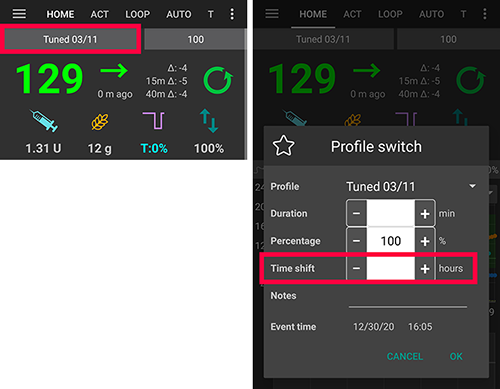
i.e. Vienna -> New York: Profile Switch +6 hours
i.e. Vienna -> Sydney: Profile Switch -8 hours
Seçenek 2: Pompa geçmişini sil
Telefon ayarlarınızda ‘Otomatik tarih ve saat’i özelliğini kapatın (manuel saat dilimi değişikliği)
Uçaktan inerken:
pompayı kapatın
telefonda saat dilimini değiştirin
telefonu kapatın, pompayı açın
pompadaki geçmişini temizleyin
pompadaki zamanı değiştirin
telefonu açın
telefonun pompaya bağlanmasına ve zaman ince ayarının yapmasına izin verin
Timezone Change for Insight
Sürücü, pompanın saatini telefonun saatine göre otomatik olarak ayarlar.
Insight, aynı zamanda, hangi andaki zamanın ve hangi (eski) zamandan hangi (yeni) zamana değiştirildiği geçmiş girdilerini de kaydeder. So the correct time can be determined in AAPS despite the time change.
It may cause inaccuracies in the TDDs. Ama sorun olmamalı.
Böylece Insight kullanıcısının saat dilimi değişiklikleri ve saat değişiklikleri konusunda endişelenmesine gerek kalmaz. Bu kuralın bir istisnası vardır: Insight pompasının esas pilini değiştirirken zaman vb. bilgileri hafızasında tutması için küçük bir dahili pili vardır. Pilin değiştirilmesi uzun sürerse bu dahili pilin enerjisi biterse saat sıfırlanır ve yeni pil taktıktan sonra saat ve tarih girmeniz istenir. Bu durumda, pil değişimi öncesindeki tüm girişler, doğru zaman tam olarak tanımlanamadığı için AAPS’deki hesaplamada atlanır.
Timezone Change for Accu-Chek Combo
The new Combo driver automatically adjusts the time of the pump to the time of the phone. Combo, saat dilimlerini depolayamaz, yalnızca yerel saati depolayabilir. Dolayısıyla yeni sürücü pompaya bunu programlar. In addition, it stores the timezone in the local AAPS preferences to be able to convert the pump’s localtime to a full timestamp that has a timezone offset. Kullanıcının herhangi bir şey yapmasına gerek yoktur; Combo’daki saat, telefonun geçerli saatinden çok fazla saparsa, pompanın saati otomatik olarak ayarlanır.
Bununla birlikte, yalnızca genellikle yavaş olan uzak terminal modunda yapılabildiğinden, bunun biraz zaman aldığını unutmayın. Bu aşılamayan bir Combo sınırlamasıdır.
Ruffy tabanlı eski sürücü, zamanı otomatik olarak ayarlamaz. Kullanıcının bunu manuel olarak yapması gerekir. Değişikliğin nedeninin saat dilimi / gün ışığından yararlanma olması durumunda bunu güvenli bir şekilde yapmak için gerekli adımlar için aşağıya bakın.
Timezone Change for Medtrum
Sürücü, pompanın saatini telefonun saatine göre otomatik olarak ayarlar.
Time zone changes keep the history intact, only TDD may be affected. Manually changing the time on the phone can cause problems with the history and IOB. If you change time manually double check the IOB.
When the time zone or time changes running TBR’s are stopped.
DAYLIGHT SAVING (DST)
Time adjustment daylight savings time
Depending on your pump and CGM setup, jumps in time can lead to problems with AAPS to function correctlyy. For instance with the Combo pump, the pump history is read twice leading to duplicate entries. For some pumps it is better to make time zone adjustments while awake and not during the night.
DST automatic adjustment for most pumps
This adjustment feature is available for AAPS version 2.2 onwards.
Howeever, the fully closed Loop will be deactivated for 3 hours AFTER the DST switch (usually 1am onwards) has taken place and AAPS will default to background basal as selected in your Profile. This is done for safety reasons - IOB may be too high due to duplicated bolus prior to DST change.
After DST has taken place, select Profile Switch to user’s desired Profile to enable fully closed Loop.
You will also receive a notification on AAPS main screen prior to DST change that the Fully Closed Loop has been disabled temporarily. This message will appear without beep, vibration or anything.**
If you bolus with AAPS’ calculator please do not use COB and IOB data unless you are sure this data is absolutely correct. Take caution and do not use this feature for a couple of hours after DST switch has taken place.
DST for Accu-Chek Insight
DST’ye geçiş otomatik olarak yapılır. Herhangi bir işlem gerekmez.
DST for Medtrum
DST’ye geçiş otomatik olarak yapılır. Herhangi bir işlem gerekmez.
DST for Omnipod Dash
Either allow AAPS to temporarily default background basal after DST has taken place as explained above.
Otherwise, if you do not want AAPS to temporarily default to background basal overnight, you can change the time zone the day prior DST is due to take place to avoid overnight disruption. NOTE THIS OPTION MAY CAUSE YOUR POD TO PREMATURELY EXPIRE. PLEASE HAVE SUPPLIES WITH YOU IF OPTING FOR THE FEATURE BELOW.
Saat değişmeden önce yapılması gerekenler
Switch OFF any Phone’s settings that automatically sets the Phone’s time zone, so the user can change to a time zone that does not use DST. How to enable this will depend on your smartphone and Android version.
Some phones have two settings, one for automatic setting of the time (which ideally should remain on) and one for automatic setting of the time zone (which you must turn OFF).
Unfortunately, some Android versions have a single switch to enable automatic setting of both the time and the timezone. Bunu şimdilik kapatmanız gerekecek.
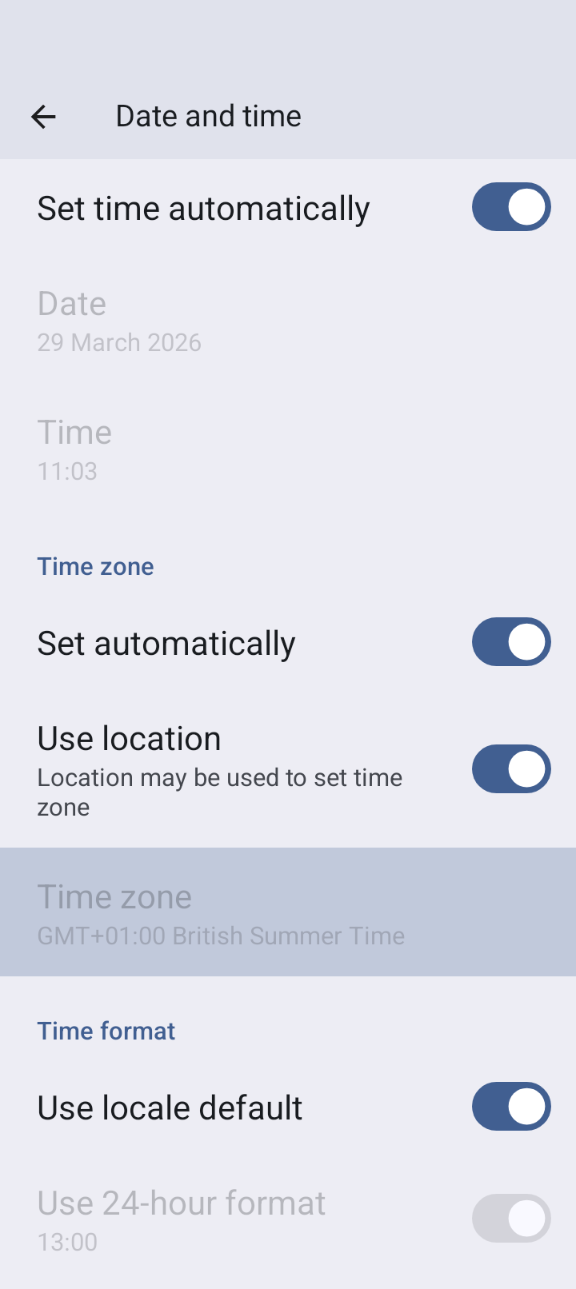
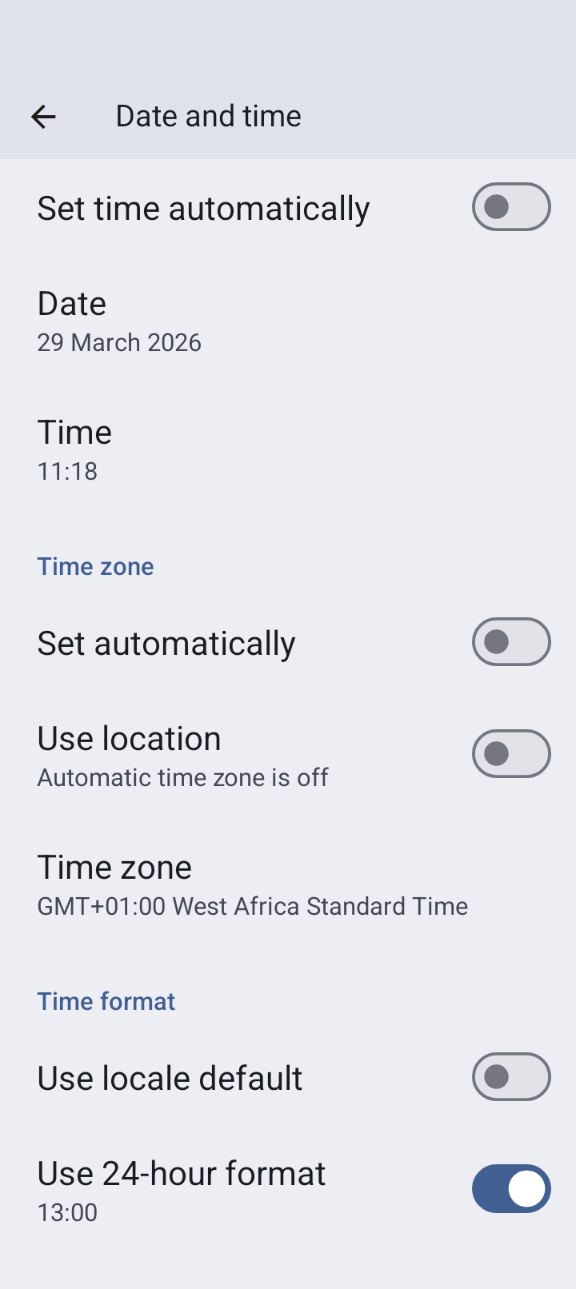
Find a timezone that has the same time as your current location but doesn’t use DST.
Bu ülkelerin listesi mevcuttur https://greenwichmeantime.com/countries
Orta Avrupa Saati (CET) için bu “Brazzaville” (Kongo) olabilir. Telefonunuzun saat dilimini Kongo olarak değiştirin.
AAPS refresh your pump and switch to your desired Profile.
Check AAPS’s IOB and COB and if this is inaccurate disable the Fully Closed Loop for at least one DIA and Max-Carb-Time - whatever is bigger.
Actions to take after the clock change. A good time to make revert to local time zone is with low IOB. E.g. an hour before a meal such as breakfast. Ideally your COB and IOB should both be close to zero.
DST for Accu-Chek Combo
This section is only valid for the old, Ruffy-based driver. The new driver adjusts date and time and DST automatically.
AAPS will issue an alarm if the time between pump and phone differs too much. In case of DST time adjustment, this would be in the middle of the night. To prevent this and enjoy your sleep instead, follow these steps so that you can force the time change at a time convenient to yourself:
Saat değişmeden önce yapılması gerekenler
Saat dilimini otomatik olarak ayarlayan herhangi bir ayarı KAPATIN, böylece istediğiniz zaman saat değişikliğini zorlayabilirsiniz. Bunu nasıl yapabileceğiniz, akıllı telefonunuza ve Android sürümünüze bağlı olacaktır.
Bazılarının iki ayarı vardır, biri saatin otomatik ayarlanması (ideal olarak açık kalması gerekir) ve diğeri saat diliminin otomatik ayarlanması için (KAPALI konuma getirmeniz gerekir).
Ne yazık ki bazı Android sürümlerinde hem saatin hem de saat diliminin otomatik olarak ayarlanmasını sağlayan tek bir anahtar bulunur. Bunu şimdilik kapatmanız gerekecek.
Screenshot_20260329-110315 (1)
Find a timezone that has the same time as your current location but doesn’t use DST.
Bu ülkelerin listesi mevcuttur https://greenwichmeantime.com/countries
Orta Avrupa Saati (CET) için bu “Brazzaville” (Kongo) olabilir. Telefonunuzun saat dilimini Kongo olarak değiştirin.
In AAPS refresh your pump.
Tedaviler sekmesini kontrol edin… Yinelenen tedaviler görürseniz:
“İleriki tedavileri sil” düğmesine basmayın
İlerideki tüm tedavilerde “kaldır”a basın ve tedavileri çoğaltın. Bu tedavileri kaldırmak yerine geçersiz kılmalıdır, böylece artık AİNS için dikkate alınmayacaktır.
Ne kadar AİNS/AKRB ile ilgili durum net değilse - kendi güvenliğiniz için lütfen en az bir İES ve Max-Carb-Time (Maksimum Karbonhidrat Süresi) için döngüyü devre dışı bırakın - hangisi daha büyükse.*
Saat değişikliğinden sonra yapılacak işlemler
A good time to make this switch would be with low IOB. E.g. an hour before a meal such as breakfast, (any recent boluses in the pump history will have been small SMB corrections. Your COB and IOB should both be close to zero.)
Android saat dilimini tekrar geçerli konumunuza değiştirin ve otomatik saat dilimini yeniden etkinleştirin.
AAPS will soon start alerting you that the Combo’s clock doesn’t match. Bu nedenle, pompanın ekranı ve düğmeleri aracılığıyla pompanın saatini manuel olarak güncelleyin.
On the AAPS “Combo” screen, press Refresh.
Ardından Tedaviler ekranına gidin ve gelecekte olabilecek olayları arayın. Çok fazla olmamalı.
“İleriki tedavileri sil” düğmesine basmayın
İlerideki tüm tedavilerde “kaldır”a basın ve tedavileri çoğaltın. Bu tedavileri kaldırmak yerine geçersiz kılmalıdır, böylece artık AİNS için dikkate alınmayacaktır.
Ne kadar AİNS/AKRB ile ilgili durum net değilse - kendi güvenliğiniz için lütfen en az bir İES ve Max-Carb-Time (Maksimum Karbonhidrat Süresi) için döngüyü devre dışı bırakın - hangisi daha büyükse.*
Normal şekilde devam edin.