Freestyle Libre 2 and 2+
The Freestyle Libre 2 sensor is now a real CGM even with the official app. Still, LibreLink cannot send data to AAPS. There are several solutions to use it with AAPS.
1. Use a Bluetooth bridge and OOP
Bluetooth transmitters can be used with the Libre 2 (EU) or 2+ (EU) and an out of process algorithm app. You can receive blood sugar readings every 5 minutes like with the Libre 1.
Check the bridge and app you want to use are compatible with your sensor and xDrip+.
The Libre2 OOP (find it here) is creating the same BG readings as with the original reader. AAPS with Libre 2 do a 10 to 25 minutes smoothing to avoid certain jumps. See below Value smoothing & raw values. OOP generates readings every 5 minutes with the average of the last 5 minutes. Therefore the BG readings are not that smooth but match the original reader device and faster follow the “real” BG readings. If you try to loop with OOP please enable all smoothing settings in xDrip+.
There are some good reasons to use a Bluetooth transmitter:
You can choose various OOP2 calibration strategies (1): have the reader values using “no calibration”, or calibrate the sensor like a Libre 1 using “calibrate based on raw” or ultimately calibrate the the readers like values with “calibrate based on glucose”.
Make sure to leave OOP1 disabled (2).→ Hamburger Menu → Settings → Less common settings → Other misc. options
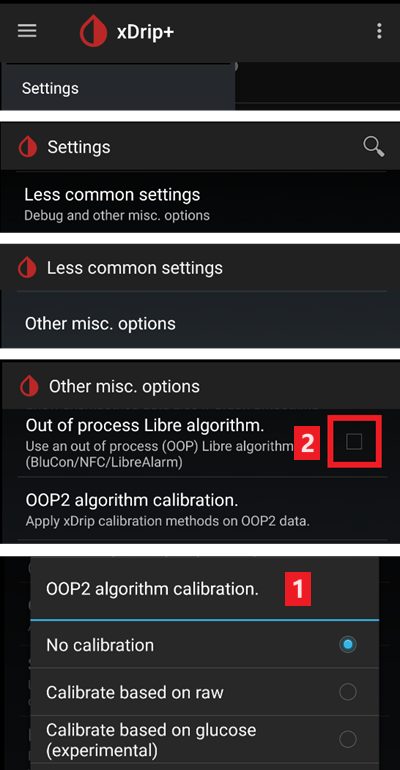
The Libre 2 sensor can be used 14.5 days as the Libre 1
8 hours backfilling is fully supported
Remark: The transmitter can be used in parallel to the LibreLink app without interfering with it.
Sensörü başlatın
→ Hamburger Menu (1) → Start sensor (2) → Start sensor (3) → Answer “Not Today” (4).
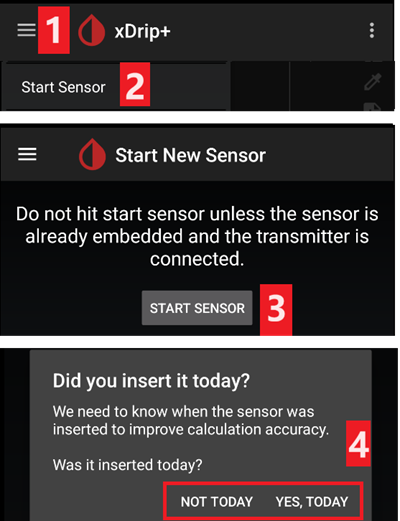
This will not physically start any Libre2 sensor or interact with them in any case. Bu sadece xDrip+’ın yeni bir sensörün kan şekeri seviyelerini ilettiğini anlamak içindir. Varsa, ilk kalibrasyon için iki ölçümlü glikometre değeri girin. Şimdi kan şekeri değerleri her 5 dakikada bir xDrip+’da görüntülenmelidir. Atlanan değerler, ör. telefonunuzdan çok uzakta olduğunuz zamanlar için, doldurulmayabilr.
Bir sensör değişikliğinden sonra xDrip+ yeni sensörü otomatik olarak algılar ve tüm kalibrasyon verilerini siler. You may check you blood glucose after activation and make a new initial calibration.
Configure AAPS (for looping only)
In AAPS go to Config Builder > BG Source and check ‘xDrip+’

If AAPS does not receive BG values when phone is in airplane mode, use ‘Identify receiver’ as describe on xDrip+ settings page.
2. Use xDrip+ direct connection
Libre 2 EU only
xDrip+ doesn’t support direct connection to Libre 2 US and AUS. Only Libre 2 and 2+ EU models.
Follow these instructions to setup xDrip+ as the original documentation links to an obsolete OOP2 version.
Follow setup instructions on xDrip+ settings page.
Select xDrip+ in in ConfigBuilder, BG Source.
Değer yumuşatma & ham değerler
Technically, the current blood sugar value is transmitted to xDrip+ every minute. A weighted average filter calculates a smoothed value over the last 25 minutes by default. You can change the period in the NFC Scan features menu.
→ Hamburger menu → Settings → NFC Scan features → Smooth libre 3 data when using xxx method
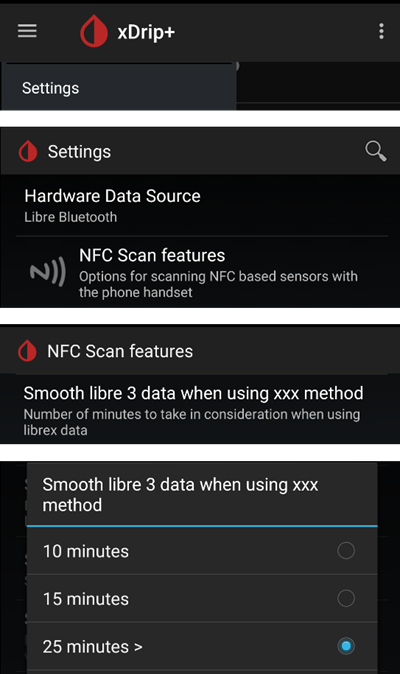
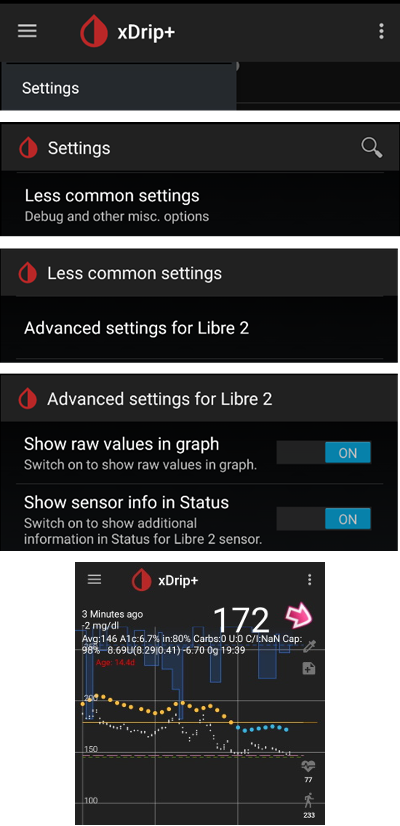
Bu döngü için zorunludur. The curves look smooth and the loop results are great. Alarmların dayandığı ham değerler biraz daha oynak olabilir, ancak okuyucunun gösterdiği değerlere karşılık gelir. Ayrıca hızlı değişimlere zamanında tepki verebilmek için ham değerler xDrip+ grafiğinde görüntülenebilir. Lütfen Xdrip+’ta Ayarlar > Gelişmiş Ayarlar > Libre2 için Gelişmiş Ayarlar “Ham değerleri göster” ve “Sensör Bilgilerini göster”i açın. Daha sonra ham değerler grafikte küçük beyaz noktalar olarak görüntülenir ve sistem menüsünde ek sensör bilgileri bulunur.
Kan şekeri hızlı hareket ettiğinde ham değerler çok faydalıdır. Noktalar daha atlamalı olsa bile, doğru tedavi kararlarını vermek için düzleştirilmiş çizgiyi kullanarak eğilimi çok daha iyi saptarsınız.
→ Hamburger menu → Settings → Less common settings → Advanced settings for Libre 2
Kalibrasyon
You can calibrate the Libre2 with an offset of -40 mg/dl to +20 mg/dL [-2,2 mmol/l to +1,1 mmol/l] (intercept). The slope isn’t changeable. Please check by fingerpricking after setting a new sensor, keeping in mind it might not be accurate in the first 12 hours after insertion. Since there can be large differences to the blood measurements, verify every 24 hours and calibrate if necessary. If the sensor is completely off after a few days, it should then be replaced.
3. Use Diabox
Install Diabox. In Settings, Integration, enable Share data with other apps.
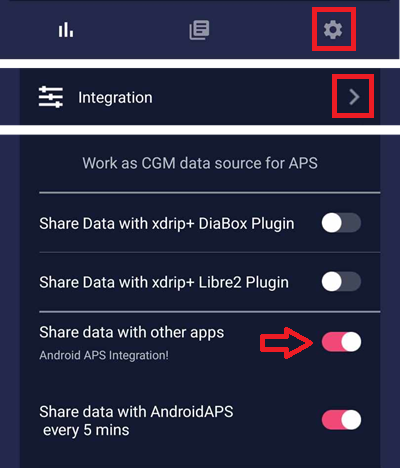
Select xDrip+ in in ConfigBuilder, BG Source.
4. Use Juggluco
See here.