Automatisierung
Was ist eine Automatisierung?
„Automation“ is a feature within AAPS which can simplify a user’s diabetes management by making automatic changes to insulin delivery in order to fit within the individual’s lifestyle needs.
An Automation instructs AAPS to carry out a specific action ‚automatically‘ as a result of one or more conditions or triggers. This can be for irregular episodic events, like low or high BG, a set amount of negative IOB. It can also be for reoccurring events, for example a meal or exercise at a certain time of day, or when the user is located within a certain distance of GPS location or WIFI SSID area.
There are a wide range of Automation options, and users are encouraged to study these within the AAPS app, in the Automation section. You can also search the AAPS user groups on Facebook and Discord for Automation examples from other users.
Wie Automatisierung helfen kann
Decreasing decision fatigue: The primary benefit of Automations is to relieve the user from the burden of having to make manual interventions in AAPS. Die Forschung schätzt, dass Menschen mit Diabetes Typ 1 täglich durchschnittlich 180 zusätzliche Entscheidungen treffen müssen. Automatisierungen können diese mentale Belastung verringern und so Freiräume für andere Dinge des Lebens schaffen können.
Potentially improving glycemic control: for example, Automations can help ensure Temp Targets are always set when needed, even during busy schedules or periods of forgetfulness. For example, if a child with diabetes has sports scheduled at school on Tuesdays at 10am and Thursdays at 2pm and requires a high Temp Target (‚TT‘) actioned 30 minutes before the sports activity, the Temp Target can be enabled by way of an Automation.
Enabling AAPS to be highly customised to be more or less aggressive in specific situations, according to a user’s preference. For example, triggering a temporary reduced Profile % for a set period of time if negative IOB develops in the middle of the night, indicating that the existing Profile may be too strong.
The example below illustrates how an Automation can enable steps to be eliminated.
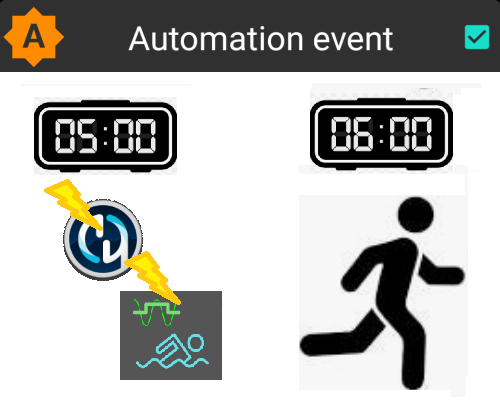
User exercises every morning at 6 am: he needs to remember to manually set a „Temp Target-Activity“ in AAPS at 5am, before exercising.
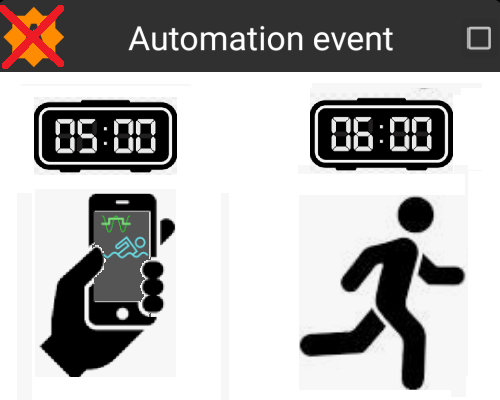
The user has set an Automation to trigger a 5am ‘Temp Target-Activity’ to ensure their BG and IOB are optimal, in preparation for their 6 am exercise:
Wichtige Vorüberlegungen, bevor mit Automatisierung gestartet wird
Before setting up an Automation, you should have reasonable BG control with AAPS. Automations should not be used to compensate for sub-optimal basal, ISF or CR settings (discussed further below). Avoid setting an automated Profile switch to compensate for BG rises due to e.g. food, these are better dealt with via other strategies (SMBs etc).
As with any technology, CGMs, Pumps and phones can malfunction: Technical issues or sensor errors can disrupt the Automation actions, and manual intervention may be needed.
Requirements for Automations are likely to change as routines change. When changing between work/school/holiday periods, set a reminder in your calendar to review which Automations are currently active (they are easy to activate and de-activate). For example, if you go on holiday, and no longer need a Automation set up for school sports or daily exercise, or need to adjust the timings.
Automations may conflict with each other, and it is good to review any new Automation(s) setting carefully in a safe environment, and understand why an Automation may or may not have triggered in the way you expect.
If using Autosens, try to use Temp Targets instead of Profile Switches. Temporäre Ziele setzen Autosens nicht auf 0 zurück. Profilwechsel setzen Autosens zurück (reset).
Most Automations should only be set for a limited time duration, after which AAPS can re-evaluate and repeat the Automation, if necessary, and if the condition is still met. For example, „start temp target of 7.0 mmol/l for 30 min“ or „start Profile 110% for 10 min“ and „start temp target of 5.0 mmol/l for 10 min“. Using Automations to create permanent changes (e.g. to stronger %profile) risks hypoglycemia.
Wann kann ich mit Automatisierungen beginnen?
Automations can be started in objective 10.
Wo finden sich die Automatisierungen in AAPS?
Depending on your config builder settings, Automation is located either in the ‘hamburger’ menu or as a tab with AAPS.
Wie kann ich eine Automatisierung einrichten?
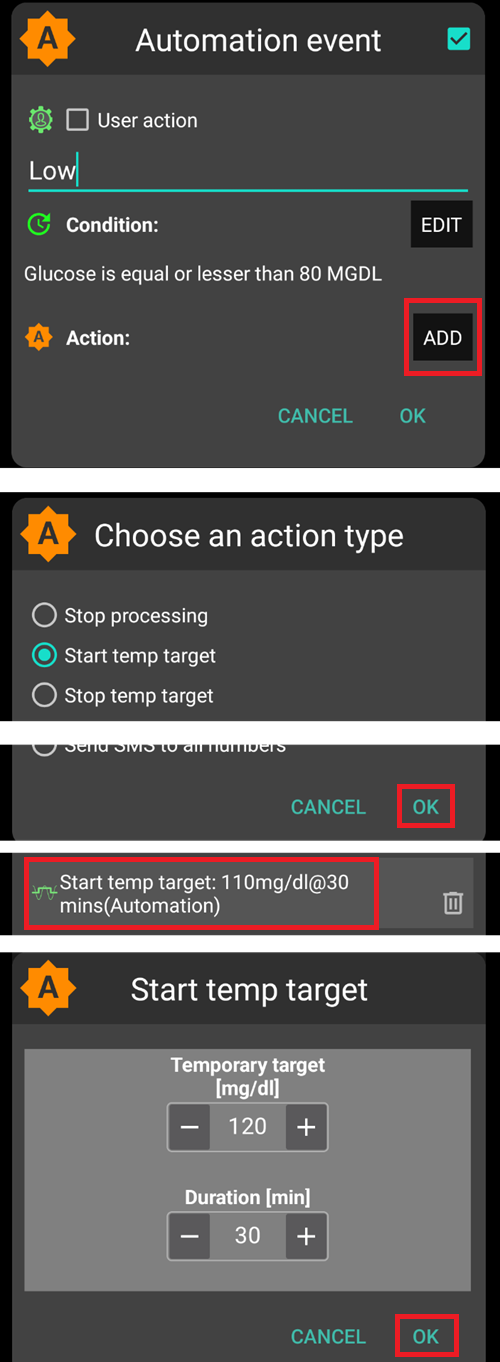
Um eine Automatisierung einzurichten, erstelle in AAPS eine ‚Regel/Aufgabe‘. Das kann so aussehen:
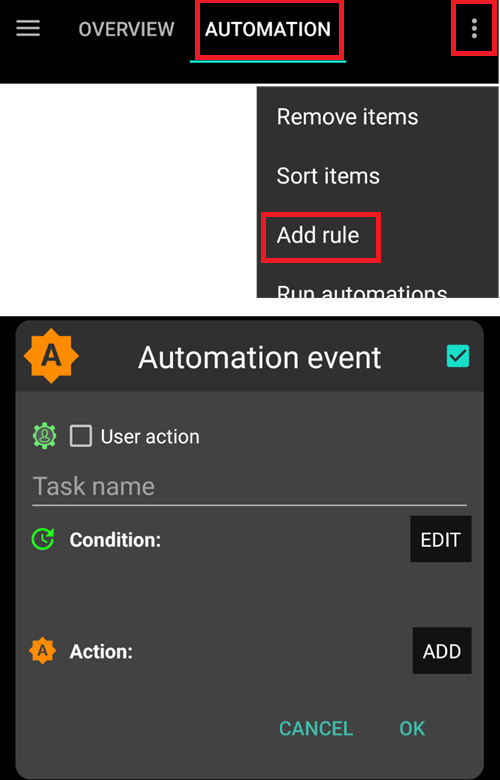
give your ‘rule’ a title;
select at least one ‘Condition’;
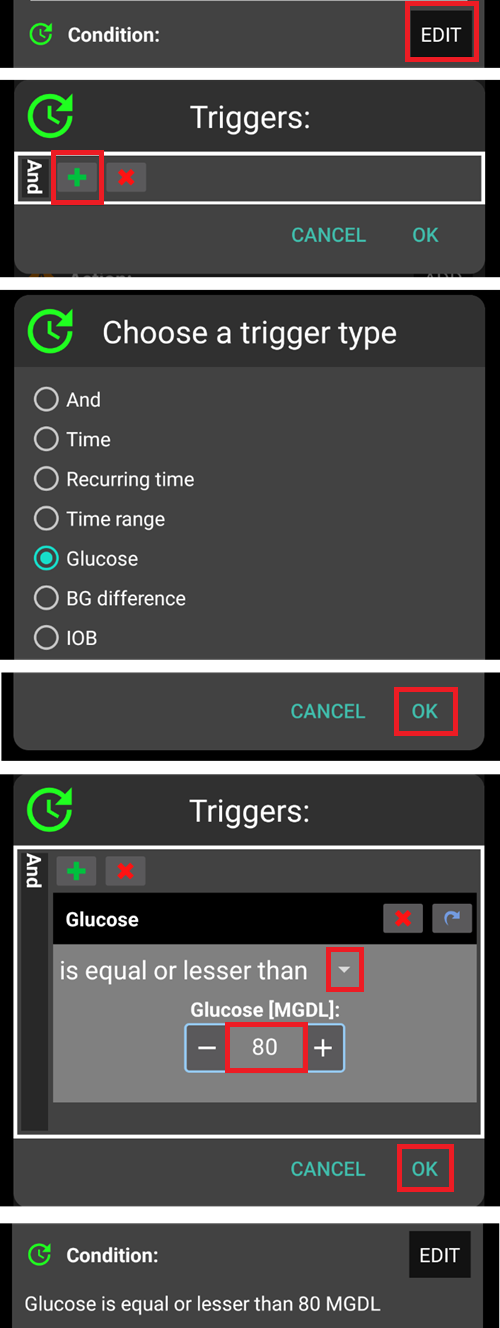
select one ‘Action’;
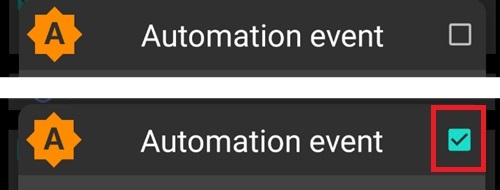
check the right box to the Automation event is ‘ticked’ to activate the Automation:
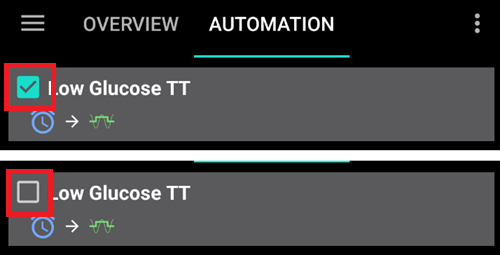
Um eine Automatisierungsregel zu deaktivieren, deaktiviere das Kästchen links neben dem Namen der Automatisierung. The example below shows an Automation entitled ‘Low Glucose TT’ as either activated (‘ticked‘) or deactivated (‘unticked’).
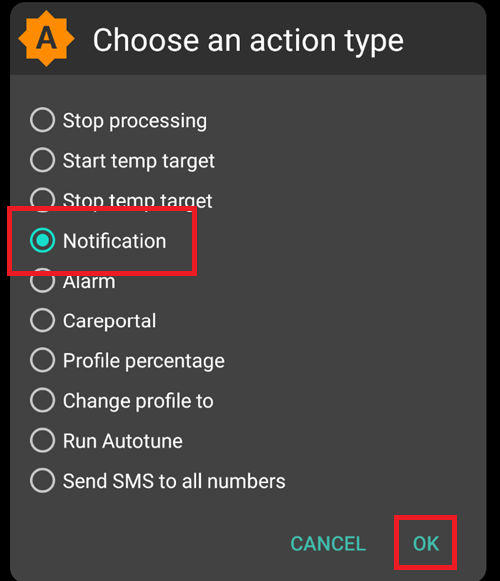
When setting up an Automation, you can first test it by activating the ‘notification’ option under „Actions“. AAPS löst damit zunächst nur eine Benachrichtigung aus und nicht eine tatsächliche automatisierte Aktion. Wenn Du dann sicher bist, dass die Benachrichtigung zur richtigen Zeit bzw. Bedingung ausgelöst worden ist, kannst Du die Automatisierungsregel anpassen und die ‚Benachrichtigung‘ durch die tatsächlich gewünschte ‚Aktion‘ ersetzen.
Important note
Automations are still active when the Loop is disabled!
Sicherheitsbeschränkungen
Es gibt Sicherheitsbeschränkungen für Automatisierungen:
Der Glukosewert muss zwischen 72 und 270 mg/dl (bzw. zwischen 4 und 15 mmol/l) liegen.
The Profile Percentage has to be between 70% and 130%.
Es müssen 5 Minuten zwischen der Ausführung der einzelnen Automatisierungen (und der erstmaligen Ausführung) liegen.
Negative Werte richtig nutzen
Warning
Please be careful when selecting a negative value in Automation
Besonderer Vorsicht bedarf es, wenn in einer Automatisierung ein ‚negativer Wert‘ innerhalb einer „kleiner als“-Bedingung genutzt werden soll. Zum Beispiel:
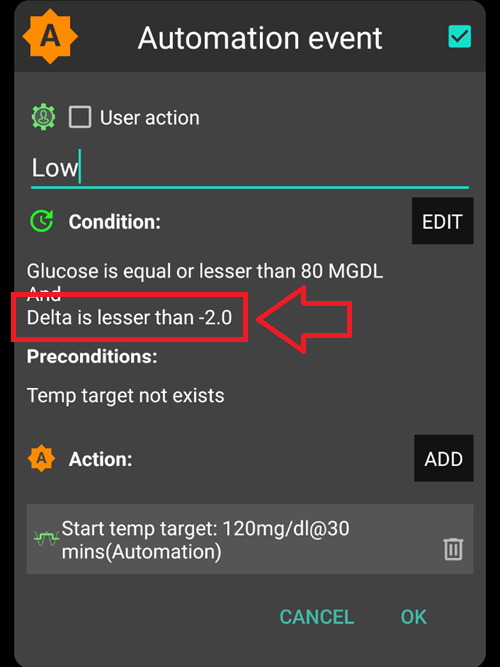
Example 1: Creating a Condition „is lesser than“ „-0.1mmol/l“ (or „-2mg/dl“) will:
Trigger an Automation for any number which is strictly less than -0.1 (-2). This includes numbers like -0.2, -0.3, -0.4 (-4, -6, -8) and so on. Remember that -0.1 (-2) itself is not included in this condition. (The condition „is equal or lesser than -0.1mmol/l (-2 mg/dl)“ would include -0.1 mmol/l or -2 mg/dl).
Example 2: Creating a Condition „is greater than“ -0.1mmol/l (-2mg/dl) will:
Trigger an Automation for any number which is greater than -0.1mmol/l (-2mg/dl). This includes numbers like 0, 0.2, 0.4mmol/l, (0, 4, 8mg/dl) and any other positive number.
Bei der Auswahl Deiner Automatisierung und der Wahl der Bedingungen und Werte, ist es wichtig genau zu wissen, welches Ziel damit erreicht werden soll.
Bedingungen in einer Automatisierung
Es gibt eine Reihe von „Bedingungen“, die ausgewählt werden können. Die folgende Liste ist nicht vollständig:
Bedingung: verknüpfe Bedingungen
Optionen:
Mit den folgenden Auslösern können mehrer Bedinungen miteinander verknüpft werden
“Und”
“Oder”
„Entweder oder“ (d.h. eine (und nur eine) der Bedingungen muss zutreffen, damit die Aktion ausgeführt wird)
Bedingung: Zeit vs. Wiederholungszeit
Optionen:
Zeit = einmaliges Ereignis
Wiederkehrende Zeit = etwas, das regelmäßig passiert (z.B. einmal pro Woche, jeden Werktag etc.)
Bedingung: Standort
Optionen:
In den Einstellungen der Automatisierungen, kann der gewünschte Standortdienst ausgewählt werden.
Bedingung: Standortdienste
Optionen:
Passiven Standort verwenden: AAPS nutzt nur die Standorte, wenn sie von anderen Apps angefordert werden.
Use network location: Location of your Wi-Fi.
GPS-Standort (Achtung! Kann zu übermäßigem Akkuverbrauch führen!)
Aktion
Aktion: Temporäres Ziel (TT) starten
Optionen:
Glukosewert muss zwischen 72 mg/dl und 270 mg/dl (bzw. zwischen 4 mmol/l und 15 mmol/l) liegen
TT> funktioniert nur, wenn aktuell kein temporäres Ziel eingestellt ist
Aktion: Temporäres Ziel (TT) stoppen
Optionen:
kein(e)
Actions: Profile Percentage
Optionen:
Prozentsatz muss zwischen 70% und 130% liegen
works only if the previous Percentage is 100%
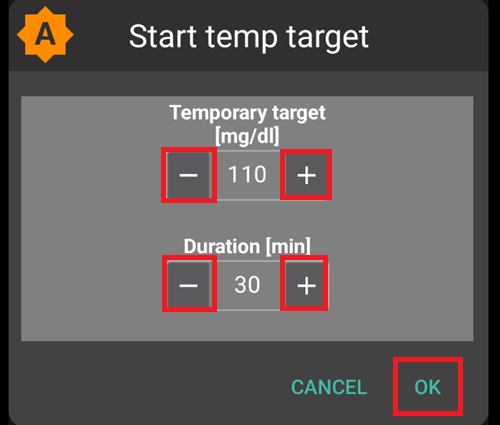
Sobald die Aktion hinzugefügt wurde, müssen die voreingestellten Werte durch Klicken auf Deine Wünsche angepasst werden.
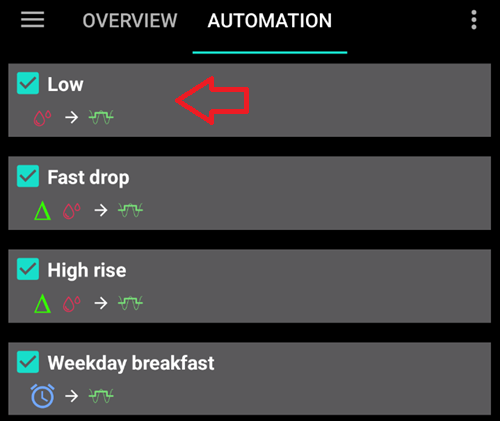
The order of the Automations in the list matters
AAPS ordnet die Regeln in der Reihenfolge, wie sie erstellt wurden und beginnt bei der oberen Automatisierung mit dem Abarbeiten der Automatisierungsliste. For example, if the ‘Low’ Automation is the most important Automation, above all other rules, then this Automation should appear at the top of the user’s Automation list as demonstrated below:
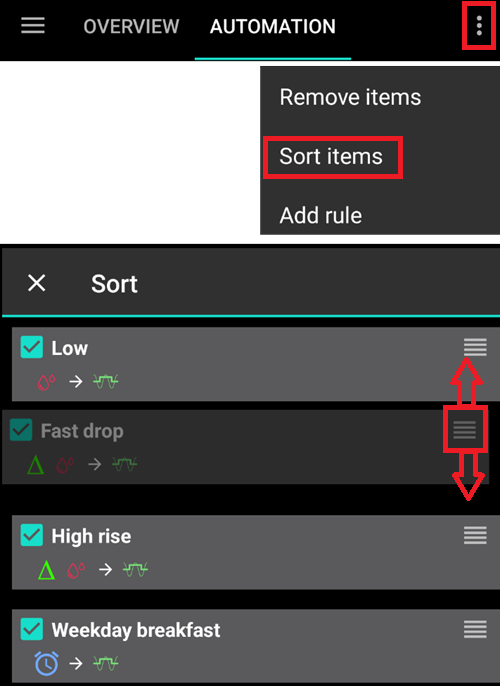
To reprioritize the Automation rules, click and hold the four-lines-button on the right side of the screen. Sortiere die Automatisierungen neu, indem Du die entsprechende Regel nach oben oder unten verschiebst.
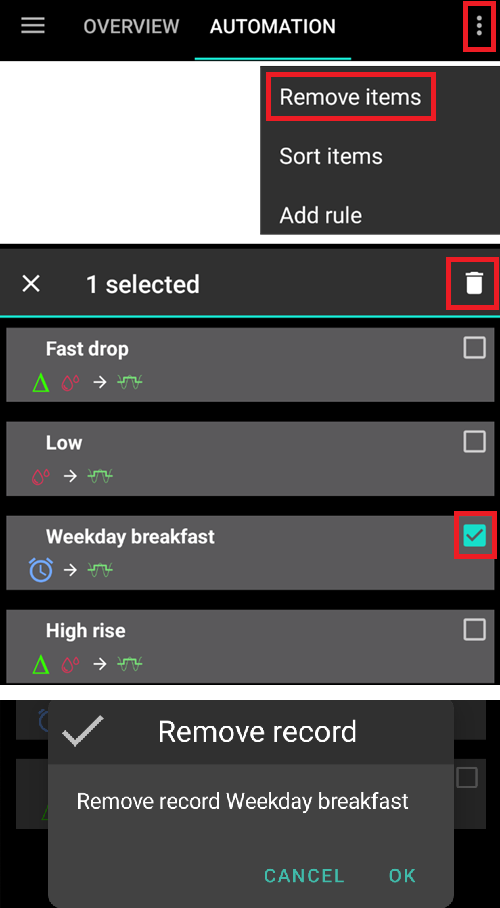
Löschen von Automatisierungsregeln
Klicke auf das Papierkorbsymbol, um eine Automatisierungsregel zu löschen.
Beispiele für Automatisierungen
Es folgen nun einige Beispiele für Automatisierungen. Weiterführende und tiefere Diskussionen über Automatisierungen im allgemeinen und einige Praxisbeispiele findest Du entweder in den Facebook-Gruppen oder auf Discord. Die folgenden Beispiele sollten nicht blind übernommenen werden. Wichtig ist, die genaue Funktionsweise der jeweiligen Automatisierung** zu verstehen, bevor sie genutzt wird.
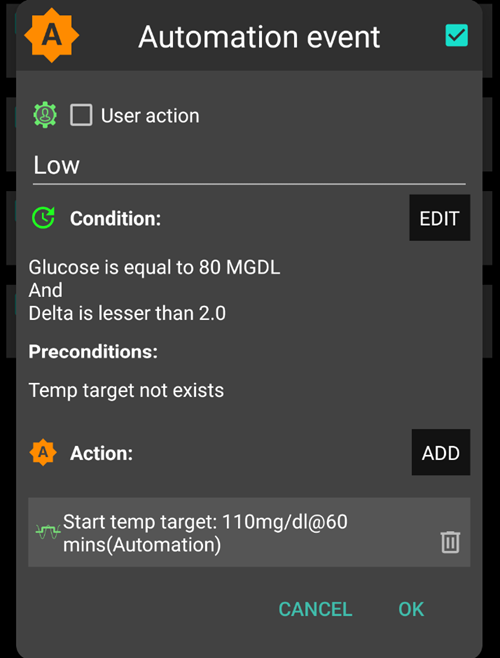
Temporäres Ziel bei niedrigem Blutzucker
Diese Automatisierung setzt beim Erreichen eines bestimmten Glukosewerts ein niedriges temporäres Ziel.
Temporäres Ziel zur Mittagszeit (abhängig vom ‚Standort‘)
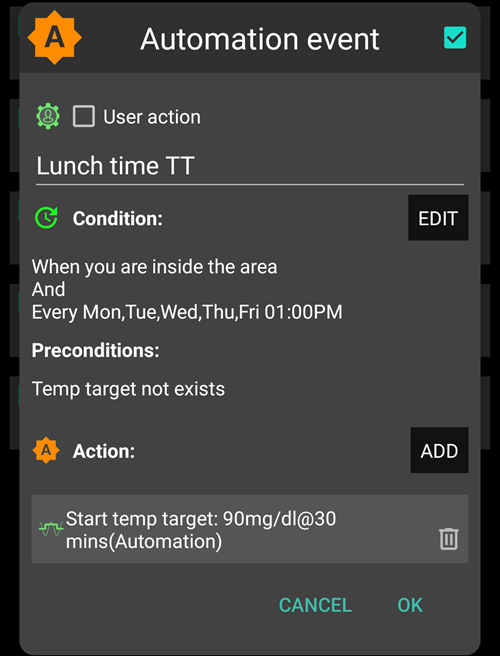
Diese Automatisierung wurde für eine Person erstellt, die das Mittagessen an Werktagen (Mo - Fr) ungefähr zur gleichen Zeit auf der Arbeit isst, und nur ausgeführt wird, wenn die Person an einem bestimmten ‚Standort‘ ist. So if the user is not at work one day, this Automation will be activated.
This Automation will set a low Temp Target (Eating Soon) at 13:00 to drive ‘BG, to 90mg (or 5 mmol/l) in preparation for lunch.
Der Standort wird als ‚Auslöser‘ eingestellt, indem die Koordinaten für Breitengrad und Längengrad wie unten angegeben werden:
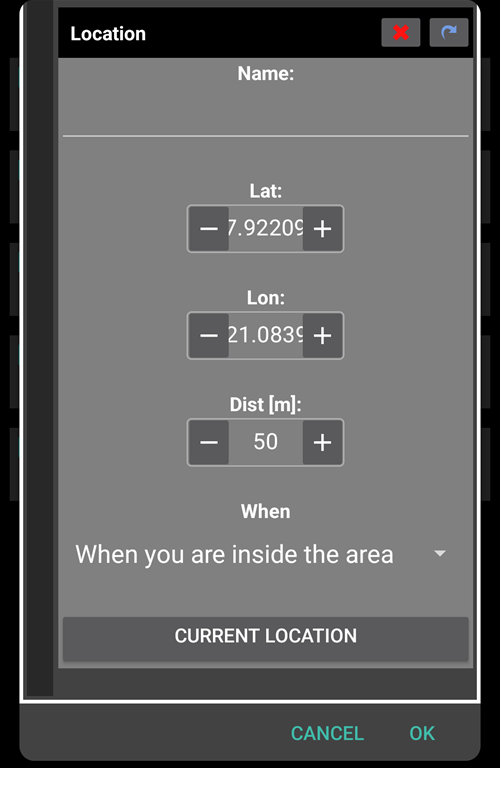
Aufgrund der ‘Und’-Verknüpfung wird die Automatisierung nur dann ausgeführt, wenn die Person sich zum gewählten Zeitpunkt am hinterlegten Standort aufhält.
The Automation will not be triggered on any other time at this location or on this time outside of 50 meters set GPS coordinates.
WLAN SSID und Standort-Automatisierungen
Wenn eine Automatisierung nur dann ausgelöst werden soll, wenn man sich in einem bestimmten WLAN-Bereich befindet, ist ‚WLAN SSID‘ ist ein guter Weg das umzusetzen. Die WLAN SSID ist im Vergleich zur GPS Position recht genau, nutzt dabei weniger Akkuleistung und funktioniert auch in geschlossenen Räumen an denen GPS oder andere Standortdienste eventuell nicht verfügbar sind.
Hier nun ein weiteres Beispiel für das frühzeitige Setzen eines temporären Ziels an Werktagen für das Frühstück (1).
Die Automatisierung wird montags - freitags (2), wenn man sich im heimischen WLAN (3) befindet, ausgelöst.
It will then set a Temp Target of 75mg/dl for 30 minutes (4). Den Standort zu berücksichtigen hat den Vorteil, dass die Automatisierung (zum Beispiel auf Reisen) nicht gestartet wird.
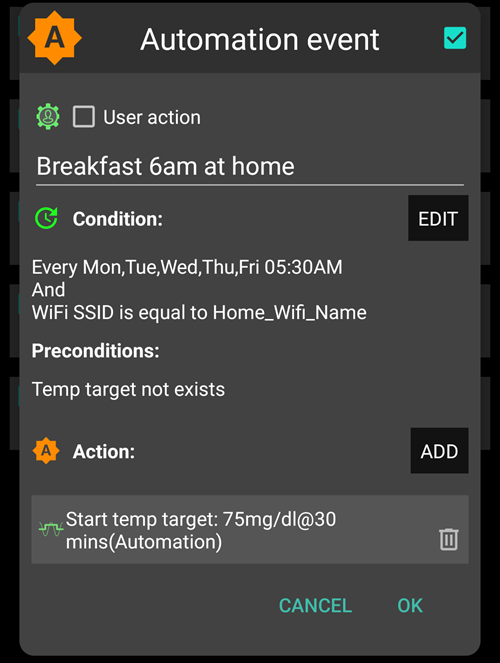
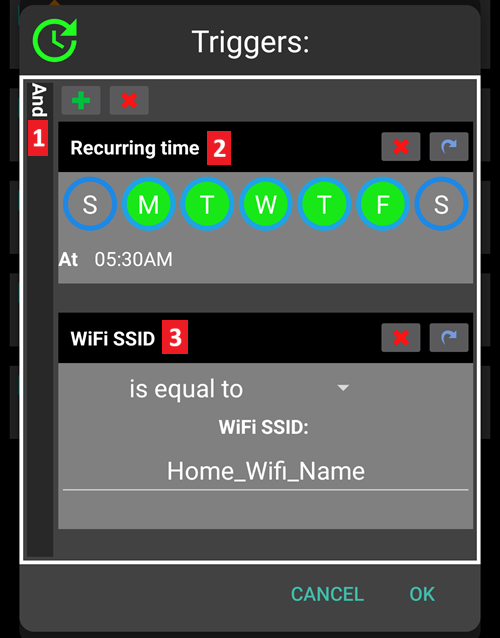
Here is the screenshot detailing the Automation triggers:
Under the main “AND” (both conditions need to be met to trigger) 1) Recurring time = M,T,W,T,F At 5:30am
WIFI SSID = My_Home_WiFi_Name
Automatisierungsprotokolle (Logs)
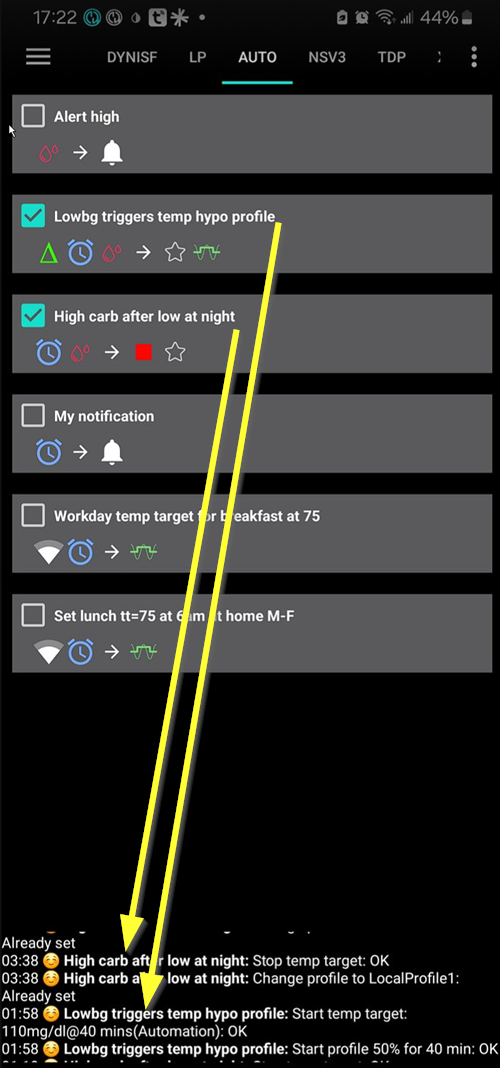
Es gibt unten am Rand des Reiters eine AAPSProtokollierung der zuletzt ausgelösten Automatisierung.
Im Beispiel unten wird das Protokoll angezeigt:
(1) um 01:58 Uhr wird „Low BG Trigger temp hypo profil“ ausgelöst
der Glukosewert ist kleiner als 75mg/dl;
das Delta ist negativ (d.h. der Glukosewert sinkt);
die aktuelle Zeit liegt zwischen 01:00h und 06:00h.
Die Automatisierung wird:
ein temporäres Ziel auf 110mg/dl für 40 Minuten setzen;
eine Profilanpassung auf 50% für 40 Minuten vornehmen.
(2) um 03:38 Uhr wird „High carb after low at night“ ausgelöst
die aktuelle Zeit liegt zwischen 01:05h und 06:00h;
der Glukosewert ist größer (höher) als 110mg/dl.
Die Automatisierung wird:
einen Profilwechsel zum LocalProfile1 ausführen (d.h. das temporäre Profil wird beendet, sofern es aktiv ist)
ein temporäres Ziel beenden (sofern eines aktiv ist)
Troubleshooting
Problem: Meine Automatisierungen werden durch AAPS nicht gestartet
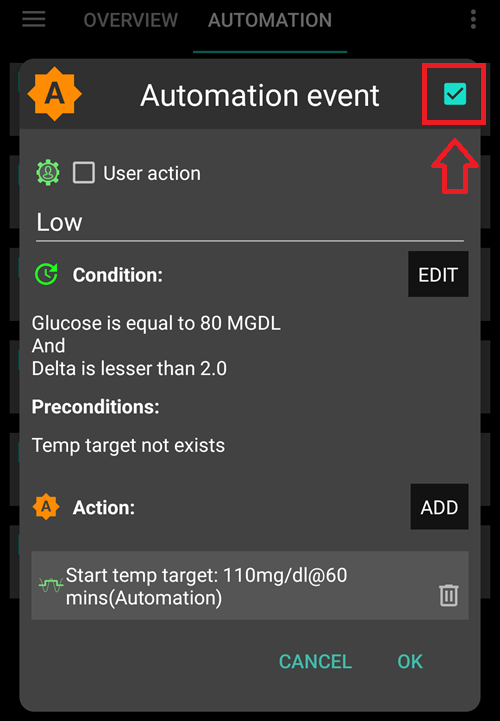
Check the box to the right of Automation event is ‘ticked’ to ensure the rule is activated.
Troubleshooting
Problem: Meine Automatisierungen werden in der falschen Reihenfolge gestartet.
Überprüfe die Reihenfolge der Regeln in Deiner Liste, so es oben beschrieben wurde.
Alternatives to Automations
Für fortgeschrittene Benutzer gibt es andere Möglichkeiten, Aufgaben mit IFTTT oder einer Drittanbieter-Android-App namens Automate zu automatisieren.