orphan: true
Dexcom G7 und ONE+
Grundlegendes im Voraus
Noteworthy is the fact that the G7 and ONE+ systems, compared to the G6, do not smooth the values, neither in the app, nor in the reader. Mehr Details dazu findest Du hier.
Average Smoothing or Exponential Smoothing MUST be enabled for meaningful use of the G7 / ONE+ values.
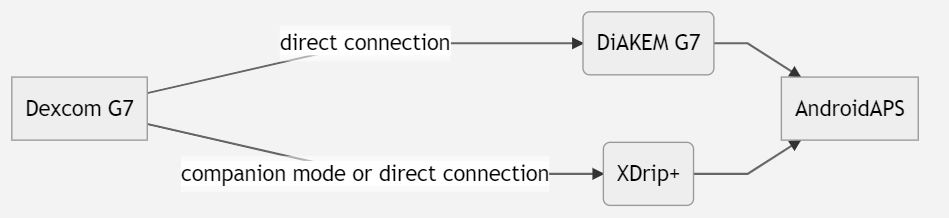
1. xDrip+ (direct connection to G7 or ONE+)
Folge den Anweisungen: xDrip+ G7
Select xDrip+ in ConfigBuilder, BG Source.
Adjust the xDrip+ settings according to the explanations on the xDrip+ settings page xDrip+ settings
2. Patched Dexcom G7 App (DiaKEM)
Note: AAPS 3.2.0.0 or higher is required! Not available for ONE+.
Installiere eine neue gepatchte (!) G7-App und starte den Sensor
A patched Dexcom G7 app (DiaKEM) gives access to the Dexcom G7 data. This is not the BYODA app as this app can not receive G7 data at the moment.
Uninstall the original Dexcom app if you used it before (A running sensor session can be continued - note the sensor code before removal of the app!)
Enter sensor code in the patched app.
Follow the general recommendations for CGM hygiene and sensor placement found here.
After the warm-up phase, the values are displayed as usual in the G7 app.
Konfiguration in AAPS
Select ‚BYODA‘ in in ConfigBuilder, BG Source - even if it is not the BYODA app!
Sollte AAPS keine Werte empfangen, wechsel auf eine andere BZ-Quelle und dann wieder zurück auf ‚BYODA‘. Damit löst Du Berechtigungsabfrage zum Datenaustausch zwischen AAPS und BYODA aus.
3. xDrip+ (Companion Mode)
Lade xDrip+ herunter und installiere es: xDrip
Wähle in xDrip+ „Companion App“ als Datenquelle aus. Zusätzlich muss in den Bluetootheinstellungen (Einstellungen > Erweiterte Einstellungen > Bluetootheinstellungen) „Companion Bluetooth“ aktiviert werden.
Select xDrip+ in in ConfigBuilder, BG Source.
Adjust the xDrip+ settings according to the explanations on the xDrip+ settings page xDrip+ settings