Key AAPS features
Loop mode
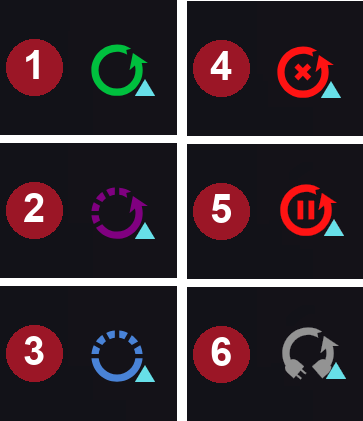
The loop status is shown on the main screen with one of the icons below.
AAPS offers several loop modes, such as Closed Loop (1), Low Glucose Suspend (LGS - 2) and Open Loop (3).
See AAPS screens > The main screen > Loop status for information on how to select the loop mode and on the other icons in the picture (4 to 6).
Open Loop
AAPS continuously evaluates all available data (IOB, COB, BG…) and makes treatment suggestions (temporary basal rates) on how to adjust your therapy if necessary.
The suggestions will not be executed automatically (as in closed loop). The suggestions have to be enacted by the user manually into the pump (if using virtual pump) or by using a button if AAPS is connected to a real pump.
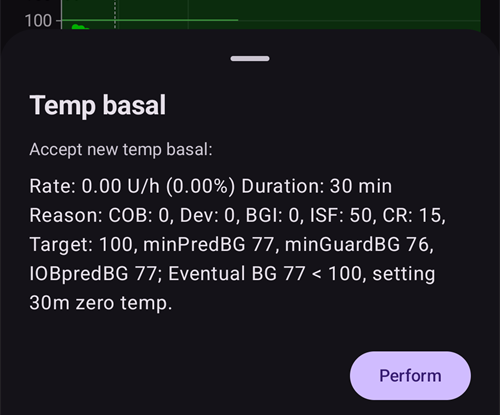
When AAPS has a suggestion, a Loop entry with a badge appears in the bottom navigation of the main screen. Press it to read the suggestion (“Accept new temp basal”) with its rate, duration and reason, then press Perform to carry it out:
A suggestion is only valid for a few minutes. If it is older than about 9 minutes, or if the loop has been suspended or the pump disconnected in the meantime, AAPS refuses it and nothing is sent to the pump (“This suggestion is too old. Nothing was sent to the pump. Wait for the next one.”). Wait for the next suggestion.
This option is for getting to know how AAPS works or if you are using an unsupported pump. You will be in Open Loop, no matter what choice you make here, until the end of Objective 5.
Low Glucose Suspend (LGS)
In this mode, maxIOB is set to zero.
This means that if blood glucose is dropping, AAPS can reduce the basal for you. But if blood glucose is rising, no automatic correction will be made. Your basal rates will remain the same as defined in your current Profile. Only if IOB is negative (from a previous Low Glucose Suspend) additional insulin will be given to lower BG.
This mode is available starting at Objective 6.
Besides selecting it yourself, AAPS can also switch to this mode on its own: while you are working on Objective 6, and whenever it detects duplicate BG readings (see BG warning sign).
Closed Loop
AAPS continuously evaluates all available data (IOB, COB, BG…) and automatically adjusts the treatment if necessary (i.e. without further intervention by you) to reach the set target range or value (bolus delivery, temporary basal rate, insulin switch-off to avoid hypo etc.).
The Closed Loop works within numerous safety limits, which can be set individually.
Closed Loop is only possible if you are in Objective 7 or higher and use a supported pump.
Autosens
Autosens is an algorithm which looks at blood glucose deviations (positive/negative/neutral).
It will try and figure out how sensitive/resistant you are based on these deviations.
The oref implementation in OpenAPS runs off a combination of 24 and 8 hours worth of data. It uses either one which is more sensitive.
If users have come from oref1 they will probably notice the system may be less dynamic to changes, due to the varying of either 24 or 8 hours of sensitivity.
Changing a cannula or changing a profile will reset Autosens ratio back to 100% (a percentual profile switch with duration won’t reset autosens).
Autosens adjusts your basal and ISF (i.e.: mimicking what a Profile shift does).
If continuously eating carbs over an extended period, Autosens will be less effective during that period as carbs are excluded from BG delta calculations.
The deviations are converted into a sensitivity ratio (a percentage): a ratio below 100% means AAPS thinks you’re more sensitive to insulin than your Profile assumes (so it lowers effective basal and raises the ISF value), while a ratio above 100% means you’re more resistant (so it raises basal and lowers the ISF value).
By default this ratio is kept between 0.7 (70%, more sensitive) and 1.2 (120%, more resistant), so a run of unusual data can’t push your dosing too far from your Profile. These bounds can be adjusted in Sensitivity Detection’s advanced settings.
Autosens and Autotune address the same underlying problem on different timescales: Autosens nudges your live dosing minute-to-minute based on the last 8-24h, while Autotune slowly rewrites your Profile itself based on weeks of history. Running both is normal and expected — they complement rather than duplicate each other.
For the full technical treatment of the autosens algorithm, see OpenAPS’s Autosens documentation.
Super Micro Bolus (SMB)
SMB, the shortform of Super micro bolus, is an OpenAPS feature introduced from 2018 onwards, within the Oref1 algorithm. In contrast to AMA, SMB does not use temporary basal rates to control glucose levels, but mainly small super micro boluses. In situations where AMA would add 1.0 IU insulin using a temporary basal rate, SMB delivers several super micro boluses in small steps at 5 minute intervals, e.g. 0.4 IU, 0.3 IU, 0.2 IU and 0.1 IU. At the same time (for safety reasons) the actual basal rate is set to 0 IU/h for a certain period to prevent overdose (‘zero-temping’). This allows the system to adjust the blood glucose faster than with the temporary basal rate increase in AMA.
Thanks to SMB, it may be sufficient for meals containing only “slow” carbs to inform the system of the planned amount of carbohydrate and leave the rest to AAPS. However, this may lead to higher postprandial (post-meal) peaks because pre-bolusing isn’t possible. Or you can give, if necessary with pre-bolusing, a start bolus, which only partly covers the carbohydrates (e.g. 2/3 of the estimated amount) and let SMB deliver the rest of the insulin.

SMBs are shown on the IOB graph with blue triangles. Press and hold the graph at a triangle to see how much insulin was delivered, or use the Treatments history.
SMB’s features contain some safety mechanisms:
Largest single SMB dose
The largest single SMB dose can only be the smallest value of:value corresponding to the current basal rate (as adjusted by autosens) for the duration set in “Max minutes of basal to limit SMB to”, e.g. basal quantity for the next 30 minutes, or
half the amount of insulin currently required, or
the remaining portion of your maxIOB value in the settings.
Low temp basal rates
Low temporary basal rates (called ‘low temps’) or temporary basal rates at 0 U/h (called ‘zero-temps’) are activated more in SMB. This is by design for safety reasons and has no negative effects if the Profile is set correctly. On the main graph, the IOB curve (yellow thin line) is more meaningful than the course of the temporary basal rates.Un-Announced Meals
Additional calculations to predict the course of glucose, e.g. by UAM (un-announced meals). Even without manual carbohydrate input from the user, UAM can automatically detect a significant increase in glucose levels due to meals, adrenaline or other influences and try to adjust this with SMB. To be on the safe side this also works the other way round and can stop the SMB earlier if an unexpectedly rapid drop in glucose occurs. That’s why UAM should always be active at SMB.
SMB doesn’t decide on its own that insulin is needed — it draws on the same blended BG predictions (eventual BG, zero-temp, COB, UAM) described in how AAPS turns predictions into a dosing decision. SMB and zero-temping are simply the two tools AAPS uses to act on that decision.
You must have started objective 9 to use SMB.
See also OpenAPS’s oref1/SMB documentation for the full technical treatment, or Tim’s info on SMB for a community write-up.
The settings for OpenAPS SMB are described below.
Maximum basal rate
This safety setting determines the maximum temporary basal rate the insulin pump may deliver. It is also known as max-basal.
The value is measured in units per hour (U/h). It is advised to set this to something sensible. A good recommendation for setting this parameter is:
MAX-BASAL = HIGHEST BASAL RATE x 4
For example, if the highest basal rate in your profile was 0.5 U/h you could multiply that by 4 to get a value of 2 U/h.
AAPS limits this value as a ‘hard limit’ according to Settings > Safety > Patient age. The hard limits are as follows:
Child: 2
Teenager: 5
Adult: 10
Insulin-resistant adult: 12
Pregnant: 25
See also overview of hard-coded limits.
Max IOB for SMB
This value determines the maximum Insulin on Board (basal and bolus IOB) that AAPS will remain under while running in closed loop mode. It is also known as maxIOB.
If the current IOB (e.g. after a meal bolus) is above the defined value, the loop stops dosing insulin until the IOB limit is below the given value.
A good start for setting this parameter is:
maxIOB = average mealbolus + 3x max daily basal
Be careful and patient when adjusting your max-IOB. It is different for everyone and can also depend on the average total daily dose (TDD).
AAPS limits this value as a ‘hard limit’ according to Settings > Safety > Patient age. The hard limits are as follows:
Child: 7
Teenager: 13
Adult: 22
Insulin resistant adult: 30
Pregnant: 70
See also overview of hard-coded limits.
Note : When using SMB, the max-IOB is calculated differently than in AMA. In AMA, maxIOB is a safety-parameter for basal IOB, while in SMB-mode, it also includes bolus IOB.
Use dynamic sensitivity
This is the DynamicISF feature. When enabled, new settings become available. Settings are explained on the DynamicISF page.
Use Autosens
This is the Autosens feature. When using DynamicISF, Autosens cannot be used, since they are two different algorithms altering the same variable (sensitivity).
Autosens looks at blood glucose deviations (positive/negative/neutral). It will try and figure out how sensitive/resistant you are based on these deviations and adjust basal rate and ISF based on these deviations.
When enabled, new settings become available.
Sensitivity raises target
If this option is enabled, the sensitivity detection (autosens) can raise the target when sensitivity is detected (below 100%). In this case your target will be raised by the percentage of the detected sensitivity.
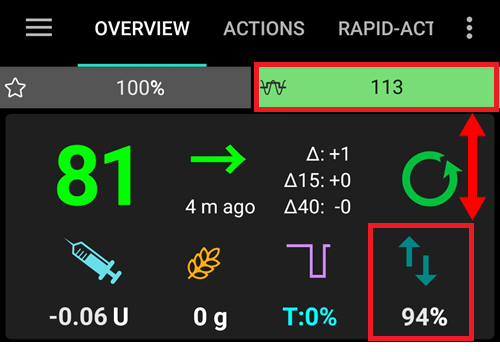
If the target is modified due to sensitivity detection, it will be displayed with a green background on your main screen.
This setting is available when one of “Use dynamic sensitivity” or “Use Autosens” are enabled.
Resistance lowers target
If this option is enabled, the sensitivity detection (autosens) can lower the target when resistance is detected (above 100%). In this case your target will be lowered by the percentage of the detected resistance.
This setting is available when one of “Use dynamic sensitivity” or “Use Autosens” are enabled.
Enable SMB
Enable this to use SMB functionality. If disabled, no SMBs will be given.
When enabled, new settings become available.
Enable SMB with high temp target
If this setting is enabled, SMBs will still be delivered even if the user has selected a high Temp Target (defined as 100 mg/dL or 5.6 mmol/L and above, regardless of Profile target). Use caution when enabling it: SMBs can become overly aggressive if your settings are not well tuned or if your Profile is subject to frequent variation (for example, with children).
When this setting is disabled, a high Temp Target turns SMBs off. For example, if this option is disabled, SMBs can be disabled by setting a Temp Target of 100 mg/dL or 5.6 mmol/L and above. This option will also disable SMBs regardless of what other condition is trying to enable SMB — apart from a low Temp Target such as Eating Soon (or any Temp Target of 98 mg/dL or 5.4 mmol/L and below), which may still deliver SMBs to drive BG towards the target.
This setting does not turn SMB on by itself. With a high temp target, SMB is only given if one of the other settings below (for example Enable SMB always or Enable SMB with COB) also allows it.
Enable SMB always
If this setting is enabled, SMB is always enabled (independent of COB, temp targets or boluses). If this setting is enabled, the rest of the enable settings below will have no effect. However, if Enable SMB with high temp targets is disabled and a high temp target is set, SMBs will be disabled.
This setting is only available if AAPS detects that you are using a reliable BG source, with advanced filtering. FreeStyle Libre 1 is not considered a reliable source due to the risk of infinitely repeating old BG data in case of sensor failure.
Noisy data could cause AAPS to believe BG is rising really fast, resulting in the administration of unnecessary SMBs. For more information about noise and data smoothing, see here.
Enable SMB with COB
If this setting is enabled, SMB is enabled when the COB is greater than 0.
This setting is not visible if “Enable SMB always” is switched on.
Enable SMB with low temp target
If this setting is enabled, SMB is enabled when a temp target is set (eating soon, activity, hypo, custom). If this setting is enabled but Enable SMB with high temp target is disabled, SMB will be enabled when a low temp target is set (98 mg/dL or 5.4 mmol/L and below) but disabled when a high temp target is set.
This setting is not visible if “Enable SMB always” is switched on.
Enable SMB after carbs
If enabled, SMB is enabled for 6h after carbohydrates are announced, even if COB has reached 0.
For safety reasons, this setting is only available if AAPS detects that you are using a reliable BG source. It is not visible if “Enable SMB always” is switched on.
This setting is only available if AAPS detects that you are using a reliable BG source, with advanced filtering. FreeStyle Libre 1 is not considered a reliable source due to the risk of infinitely repeating old BG data in case of sensor failure.
Noisy data could cause AAPS to believe BG is rising really fast, resulting in the administration of unnecessary SMBs. For more information about noise and data smoothing, see here.
This setting is not visible if “Enable SMB always” is switched on.
SMB interval
This feature limits the frequency of SMBs. This value determines the minimum time between SMBs. Note that the loop runs every time a glucose value comes in (generally 5 minutes). Subtract 2 minutes to give loop additional time to complete. E.g. if you want SMB to be given every loop run, set this to 3 minutes.
Default value: 3 min.
Max minutes of basal to limit SMB
This is an important safety setting. This value determines how much SMB can be given based on the amount of basal insulin in a given time, when it is covered by COBs.
Making this value larger allows the SMB to be more aggressive. You should start with the default value of 30 minutes. After some experience, increase the value in 15 minutes increments and observe the effects over multiple meals.
It is recommended not to set the value higher than 90 minutes, as this would lead to a point where the algorithm might not be able to accommodate a decreasing BG with 0 U/h basal (‘zero-temp’). You should also set alarms, especially if you are still testing new settings, which will warn you well before a hypo.
Default value: 30 min.
UAM max minutes of basal to limit SMB
This setting allows you to adjust the strength of SMB during UAM, when there are no more carbs.
Default value : the same as Max minutes of basal to limit SMB.
This setting is only visible if “Enable SMB” and “Enable UAM” are switched on.
Enable UAM
With this option enabled, the SMB algorithm can recognize unannounced meals. This is helpful if you forget to tell AAPS about your carbs or estimate your carbs wrong and the amount of entered carbs is wrong or if a meal with lots of fat and protein has a longer duration than expected. Without any carb entry, UAM can recognize fast glucose increase caused by carbs, adrenaline, etc., and tries to adjust it with SMBs. This also works the opposite way: if there is a fast glucose decrease, it can stop SMBs earlier.
Therefore, UAM should always be activated when using SMB.
Carbs required threshold
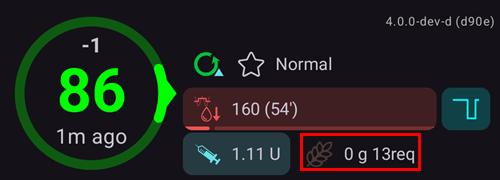
Minimum grams of carbs to display a carbs suggestion alert. Eating of additional carbs will be suggested when the reference design detects that it requires carbs. In this case you will receive a notification which can be snoozed for 5, 15 or 30 minutes.
Carb required notifications can be pushed to Nightscout if wished, in which case an announcement will be shown and broadcast.
In any case, the required carbs will be displayed in the COB section on your main screen.
Advanced Settings
For the full parameter reference (including settings not covered here), see OpenAPS’s preferences and safety settings documentation.
Always use short average delta instead of simple delta If you enable this feature, AAPS uses the short average delta/blood glucose from the last 15 minutes, which is usually the average of the last three values. This helps AAPS to be steadier with noisy data sources like xDrip and Libre.
Max daily safety multiplier This is an important safety limit. The default setting (which is unlikely to need adjusting) is 3. This means that AAPS will never be allowed to set a temporary basal rate that is more than 3x the highest hourly basal rate programmed in a user’s pump and/or profile. Example: if your highest basal rate is 1.0 U/h and max daily safety multiplier is 3, then AAPS can set a maximum temporary basal rate of 3.0 U/h (= 3 x 1.0 U/h).
Default value: 3 (shouldn’t be changed unless you really need to and know what you are doing)
Current Basal safety multiplier This is another important safety limit. The default setting (which is also unlikely to need adjusting) is 4. This means that AAPS will never be allowed to set a temporary basal rate that is more than 4x the current hourly basal rate programmed in a user’s pump and/or profile.
Default value: 4 (shouldn’t be changed unless you really need to and know what you are doing)
Auto ISF
Auto ISF is an experimental algorithm for advanced users. It is built on OpenAPS SMB and adds rules that make the insulin sensitivity factor (ISF) stronger or weaker depending on how your glucose behaves.
It is a development feature: it can only be switched on in a dev build with Engineering Mode enabled. In a regular release build it stays forced off and is therefore not shown in Configuration → APS. Completing the Objectives does not unlock it.
After selecting it, its Settings contain the OpenAPS SMB settings plus an AutoISF settings group:
Enable AutoISF: turns the ISF adjustments on. Without it, the algorithm behaves like OpenAPS SMB.
AutoISF min and AutoISF max: how weak and how strong the ISF is allowed to become, in the same way as the Autosens limits. With the default value 1.0 the effect is switched off.
Weights: each one drives one rule, and the default value 0.0 switches the rule off.
while glucose accelerates, ISF is strengthened (more insulin);
while glucose decelerates, ISF is weakened (less insulin);
while glucose is below target, ISF is weakened;
while glucose is above target, ISF is strengthened;
a post-prandial weight and a duration weight act after meals and when glucose stays high for a long time.
SMB delivery ratio (with a minimum, a maximum and a BG range): what share of the insulin required can be delivered as SMB.
SMB max range extension: by what factor the usual SMB size limit (max minutes of basal, 30 minutes by default) may be exceeded. The default value 1 changes nothing; up to 5 is possible. Increase this experimental value slowly and with caution.
IOB threshold percent: the percentage of max IOB above which SMBs are disabled.
Only for experienced users
With its default values Auto ISF changes nothing. Every value you raise makes AAPS more aggressive. Change one value at a time, in small steps, and watch the result for several days. Be extremely careful with an AutoISF max above 2.5.
Advanced Meal Assist (AMA)
AMA, the short form of “advanced meal assist” is an OpenAPS feature from 2017 (oref0). OpenAPS Advanced Meal Assist (AMA) allows the system to high-temp more quickly after a meal bolus if you enter carbs reliably.
You can find more information in the OpenAPS documentation.
Maximum basal rate (OpenAPS “max-basal”)
This safety setting helps AAPS from ever being capable of giving a dangerously high basal rate and limits the temp basal rate to x U/h. It is advised to set this to something sensible. A good recommendation is to take the highest basal rate in your profile and multiply it by 4 and at least 3. For example, if the highest basal rate in your profile is 1.0 U/h you could multiply that by 4 to get a value of 4 U/h and set the 4 as your safety parameter.
You cannot choose any value: For safety reason, there is a ‘hard limit’, which depends on the patient age. The ‘hard limit’ for maxIOB is lower in AMA than in SMB. For children, the value is the lowest while for insulin resistant adults, it is the biggest.
The hardcoded parameters in AAPS are:
Child: 2
Teenager: 5
Adult: 10
Insulin resistant adult: 12
Pregnant: 25
See also overview of hard-coded limits.
Max IOB for AMA
This parameter limits the maximum of basal IOB where AAPS still works. If the IOB is higher, it stops giving additional basal insulin until the basal IOB is under the limit.
The default value is 2, but you should raise this parameter slowly to see how much it affects you and which value fits best. It is different for everyone and also depends on the average total daily dose (TDD). For safety reason, there is a limit, which depends on the patient age. The ‘hard limit’ for maxIOB is lower in AMA than in SMB.
Child: 3
Teenager: 5
Adult: 7
Insulin resistant adult: 12
Pregnant: 25
See also overview of hard-coded limits.
Use Autosens (AMA)
Here, you can choose, if you want to use the sensitivity detection autosens or not.
Autosens adjust targets
If you have this option enabled, autosens can adjust targets (next to basal and ISF), too. This lets AAPS work more ‘aggressive’ or not. The actual target might be reached faster with this.
Advanced Settings
Normally you do not have to change the settings in this dialog!
If you want to change them anyway, make sure you understand what you are doing — see the full parameter reference in OpenAPS’s preferences and safety settings documentation.
Always use short average delta instead of simple delta If you enable this feature, AAPS uses the short average delta/blood glucose from the last 15 minutes, which is usually the average of the last three values. This helps AAPS to work more steady with noisy data sources like xDrip and Libre.
Max daily safety multiplier This is an important safety limit. The default setting (which is unlikely to need adjusting) is 3. This means that AAPS will never be allowed to set a temporary basal rate that is more than 3x the highest hourly basal rate programmed in a user’s pump. Example: if your highest basal rate is 1.0 U/h and max daily safety multiplier is 3, then AAPS can set a maximum temporary basal rate of 3.0 U/h (= 3 x 1.0 U/h).
Default value: 3 (shouldn’t be changed unless you really need to and know what you are doing)
Current Basal safety multiplier This is another important safety limit. The default setting (which is also unlikely to need adjusting) is 4. This means that AAPS will never be allowed to set a temporary basal rate that is more than 4x the current hourly basal rate programmed in a user’s pump.
Default value: 4 (shouldn’t be changed unless you really need to and know what you are doing)
Bolus snooze dia divisor The feature “bolus snooze” works after a meal bolus. AAPS doesn’t set low temporary basal rates after a meal in the period of the DIA divided by the “bolus snooze”-parameter. The default value is 2. That means with a DIA of 5h, the “bolus snooze” would be 5h : 2 = 2.5h long.
Default value: 2
Overview of hard-coded limits
Child |
Teenager |
Adult |
Insulin resistant adult |
Pregnant |
|
|---|---|---|---|---|---|
MAXBOLUS |
5 |
10 |
17 |
25 |
60 |
MINDIA |
5 |
5 |
5 |
5 |
5 |
MAXDIA |
9 |
9 |
9 |
9 |
10 |
MINIC |
2 |
2 |
2 |
2 |
0.3 |
MAXIC |
100 |
100 |
100 |
100 |
100 |
MAXIOB_AMA |
3 |
5 |
7 |
12 |
25 |
MAXIOB_SMB |
7 |
13 |
22 |
30 |
70 |
MAXBASAL |
2 |
5 |
10 |
12 |
25 |