Remote monitoring
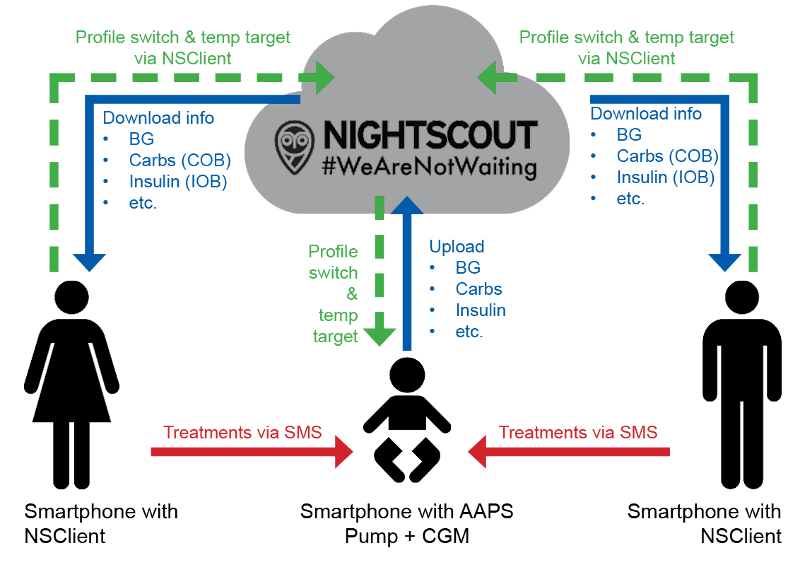
AAPS offers several features for remote monitoring of type 1 diabetic children and also faciltates remote commands which sends instructions to the AAPS remotely. Similarly, AAPSClient can also be used for remote monitoring to follow your partner’s or friend’s AAPS.
Functions
Kid’s pump is controlled by kid’s phone using AAPS.
Caregivers can remotely follow viewing all relevant data such as glucose levels, carbs on board, insulin on board etc. using AAPSClient apk on their phone which must be an Android phone. Settings amended in AAPS will synchromise with AAPSClient and vice versa.
Caregivers can be alarmed by using xDrip+ app in follower mode on their Android phone if xdrip companion mode is set up.
Remote control of AAPS using SMS Commands is secured by two-factor authentication.
Remote control through AAPSClient is only recommended if your synchronization is working well (ie. you don’t see unwanted data changes like self modification of TT, TBR etc) see release notes for Version 2.8.1.1 for further details. However synchonization is less likely to an issue if the user if usiing the latest version of AAPS and __AAPSClient with NSClientv3/Nightscout15.
Tools and apps for remote monitoring
Nightscout in web browser (mainly data display)
AAPSClient apk is a stripped down version of AAPS capable of following somebody, making Profile Switches, setting TTs and entering carbs. There are 2 apps: AAPSClient & AAPSClient2 to download. AAPSClient should be used is the caregivers wishes to install the apk twice on the same phone to follow 2 different persons (e.g two children with type 1 each with their own nightscout acccount).
Dexcom follow if you are using original Dexcom app (BG values only)
xDrip+ in follower mode (mainly BG values and alarms)
Some users find a full remote access tool like TeamViewer to be helpful for advanced remote troubleshooting
Smartwatch options
A smartwatch can be a very useful tool in helping manage AAPS with T1D kids. A couple of different options are possible:
Option 1 - If AAPSClient is installed on the caregiver’s phone, the AAPSClient WearOS app can be installed on a compatible smartwatch connected to the caregiver’s phone. This will show current BG, loop status and allow carb entry, Temp Targets and Profile changes. It will NOT allow bolusing from the WearOS app.
Option 2 - Alternatively, the AAPS WearOS app can be built and installed on a compatible smartwatch, connected to the kid’s phone but worn by the parent. This includes all the functions listed above as well as the ability to bolus insulin. This allows the caregiver o administer insulin without needing to remove the kid’s phone from however it is kept on them.
Things to consider
Consider time gap between master and follower due to time for up- and download as well as the fact that AAPS master phone will only upload after loop run.
What is your emergency plan for when remote control does not work (i.e. network problems or lost bluetooth connection)? Always consider what will happen with AAPS if you suddenly can’t send a new command. AAPS overwrites the pump basal, ISF and ICR with the current profile values. Only use temporary profile switches (i.e. with a set time duration) if switching to a stronger insulin profile, in case your remote connection is disrupted. Then the pump will revert to the original profile when the time expires.