Juggluco settings
If not already set up, then download Juggluco.
Follow the instructions to connect your sensor.
Basic settings for all CGM systems
Disable Nightscout uploader
You shouldn’t let any other app upload data (blood glucose and treatments) to Nightscout.
Disable any active uploader to Nightscout in Juggluco.

Juggluco to AAPS
Juggluco can send blood glucose directly to AAPS, enabling SMBs always if you are using a trusted sensor.
When using a Libre 2/2+/3/3+ sensor, minute-by-minute readings will be sent to AAPS but will not trigger minute-by-minute calculations in AAPS.
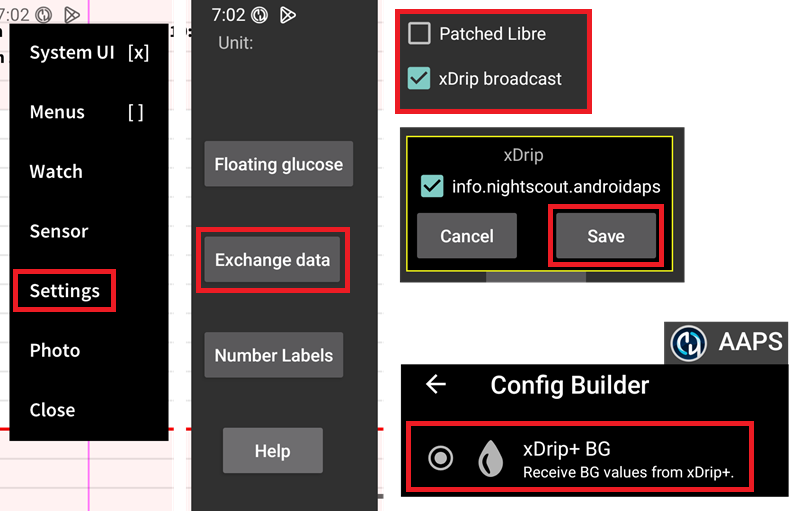
Enable xDrip broadcast in Juggluco (do not enable Patched Libre), confirm and save the AAPS package information. Select the xDrip BG data source in AAPS.
Apply sufficient smoothing in AAPS.
Juggluco to xDrip
Juggluco can send blood glucose to xDrip which will then send them to AAPS.
Enable Patched Libre in Juggluco (do not enable xDrip broadcast), confirm and save the dexdrip package information. Select the xDrip BG data source in AAPS.
Apply sufficient smoothing in AAPS if necessary. When using a Libre 2/2+/3/3+ sensor, xDrip will average the minute-by-minute readings to 5-minute readings and also smooth them.
