Juggluco settings
If not already set up, then download Juggluco.
Follow the instructions to connect your sensor.
Basic settings for all CGM systems
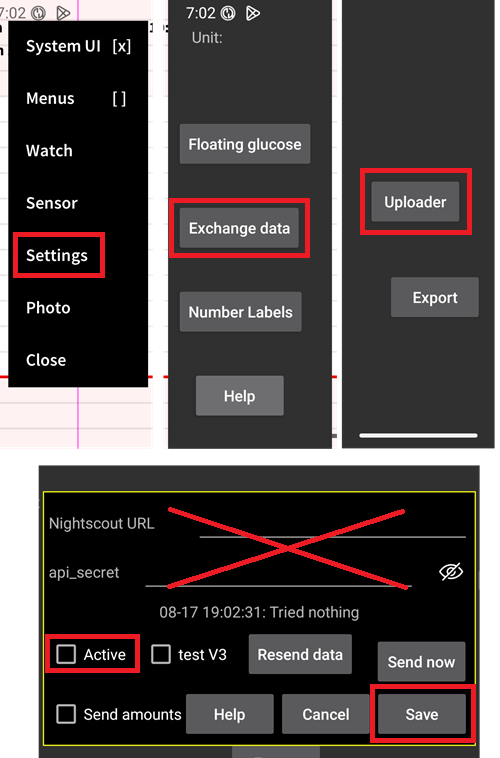
Disable Nightscout uploader
从AAPS 3.2版本开始,您不应允许其他任何应用向Nightscout上传数据(血糖和治疗记录)。
Disable any active uploader to Nightscout in Juggluco.
Juggluco to AAPS
Juggluco can send blood glucose directly to AAPS, enabling SMBs always if you are using a trusted sensor.
When using a Libre 2/2+/3/3+ sensor, minute-by-minute readings will be sent to AAPS but will not trigger minute-by-minute calculations in AAPS.
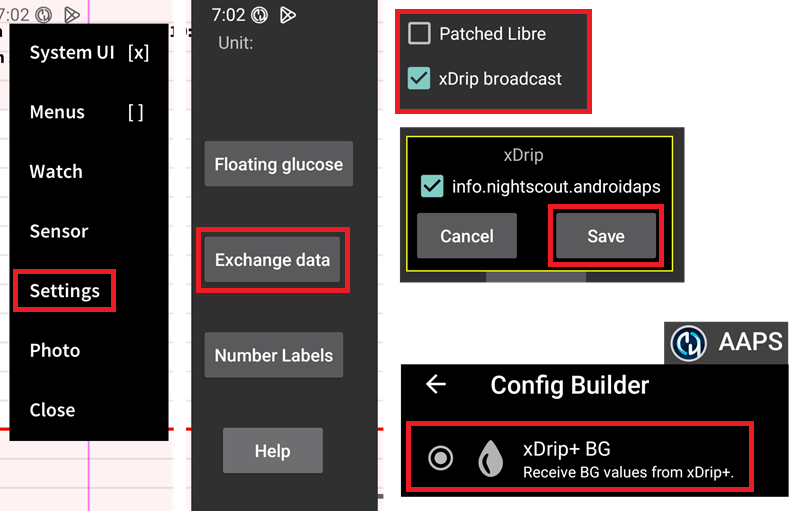
Enable xDrip broadcast in Juggluco (do not enable Patched Libre), confirm and save the AAPS package information. Select the xDrip+ BG data source in AAPS.
Apply sufficient smoothing in AAPS.
Juggluco to xDrip+
Juggluco can send blood glucose to xDrip+ which will then send them to AAPS.
Enable Patched Libre in Juggluco (do not enable xDrip broadcast), confirm and save the dexdrip package information. Select the xDrip+ BG data source in AAPS.
Apply sufficient smoothing in AAPS if necessary, when using a Libre 2/2+/3/3+ sensor, xDrip+ will average the minute-by-minute to 5 minutes readings and also smoothen them.
