更新到新版本或分支
自行构建而非下载
由于医疗设备相关的法规,AAPS无法下载。 构建该应用供自己使用是合法的,但不得将副本提供给他人 详情请参阅常见问题页面。
重要说明
当有新版本发布时,请尽快更新至最新版本的 AAPS。
当有新版本可用时,AAPS 应用内会显示新版本的信息横幅。
新版本发布时也会在 Facebook 上同步公告。
Following the release, please read the Release Notes in detail, and clarify any queries with the community on Facebook or Discord, before proceeding with the update.
Do not forget to export your AAPS’ settings.
Update AAPS with browser build
If you already built your AAPS app with the Browser Build method, follow these instructions.
Update AAPS with Android Studio
Follow these instructions..
Update AAPS with the command-line
Use the same instructions as when building AAPS previously, but pull new changes with git.
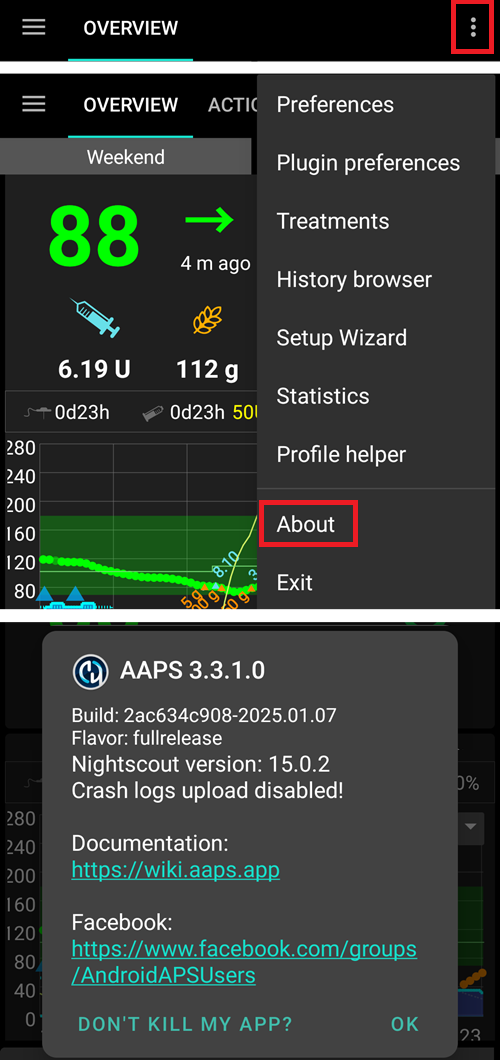
检查手机上的 AAPS 版本
请查阅 版本说明 确认是否有更新后的特别注意事项。
After you installed the new apk:
you can check the AAPS’ version on your phone by clicking the three dots menu on the top right and then ‘About’ (as per the screenshot below). The AAPS’ current version can be viewed;
ensure import settings have been actioned;
action a ‘full synchroniation’ under NSClient to ensure AAPS is working off accurate & complete data; and
please check your AAPS’ settings under Preferences and ensure these remain accurate.