Smartwatches and AAPS
Various smartwatches can be used to display some of the information available in AAPS or perform remote actions.
Having a smartwatch directly control AAPS (pump and sensor) is achieved using full Android watches (that are considered like small smartphones).
Some smartwatches can allow you to enter treatments, or more, but with the phone itself still managing AAPS.
Смарт-часы все чаще используются с AAPS и для взрослых с диабетом и опекунов/родителей детей с диабетом.
Преимущества смарт-часов в связке с AAPS
Смарт-часы - в зависимости от модели - могут найти различное применение с AAPS. С их помощью можно полностью или частично контролировать работу AAPS, а также проверять уровни гликемии, количество активного инсулина и другие параметры.
Интеграция смартфонов с AAPS может быть полезна во многих ситуациях, включая вождение автомобиля, мотоцикла, велосипеда, во время занятий спортом и т. п. Some people feel that looking at a watch (in a meeting, party, dinner table etc.) is more discreet than looking at a phone. From a security perspective, a smartwatch can also be beneficial while on the move, enabling the user to keep their AAPS phone stored out of sight (like inside a bag), while still using the smartwatch for remote control.
Конкретные преимущества AAPS для родителей/опекунов
For a child - if their AAPS phone is nearby - a caregiver can use a smartwatch to monitor or make modifications without needing to use the AAPS phone. Это может пригодиться, например, если телефон AAPS скрыт в поясе для помпы.
A smartwatch can be used either in addition to, or as an alternative to the PHONE-based options for remote control or following only.
Additionally, unlike parent/caregiver follower phones (which rely on the mobile network or Wi-Fi connection), Bluetooth connected smartwatches can be useful in remote locations, like a cave, in a boat, or half-way up a mountain. If both devices (AAPS phone and smartwatch) are on the same Wi-Fi network, they can also use Wi-Fi.
Различные типы взаимодействия смарт-часов и AAPS
В настоящее время существует пять основных способов использования смарт-часов в связке с AAPS. Эти данные приводятся ниже в таблице:
Watch Setup |
Features |
Что потребуется: |
|---|---|---|
Standalone |
AAPS without a phone |
Full Android smartwatch (check min Android) Running app-fullRelease |
Full remote control |
Most AAPS functions |
Android Wear OS watch (check Android/API)Running wear-fullRelease |
Remote control |
AAPSClient functions |
Android Wear OS watch (check Android/API)Running wear-aapsclientRelease |
Remote control |
Some AAPSClient functions |
Garmin watches(older Samsung Tizen and Fitbit setups only, not recommended)See below. |
Display |
Glucose, trend, IOB, COB, loop and pump status |
Many smartwatches, through a companion app on the AAPS phone fed by the External Companion Apps broadcast: WatchDrip+ (Xiaomi, Amazfit), GlucoDataHandler (Wear OS), G-WatchSee below. |
Перед тем как купить смарт-часы…
Модель, которую вы покупаете, зависит от желаемых функций. You may find useful information on the Phones page, including a list of tested phones that also contains some smartwatches.
Popular watch brands include Samsung Galaxy, Garmin, Fossil and Mi band. The different options summarized in the Table above are explained in more detail below, to help you decide which smartwatch is right for your situation.
Если вы интегрируете смарт-часы с телефоном AAPS чтобы удаленно взаимодействовать с AAPS, нужно учитывать, совместимы ли оба устройства друг с другом, особенно если у вас устаревший или необычный телефон.
В общем, если вы хотите только следить за гликемией и не взаимодействовать с AAPS, то имеется большой выбор доступных и простых смарт-часов.
The best way to choose a smartwatch is to search for «watch» posts on either Discord or Facebook AAPS groups. Have a read of others“ experiences, and post any specific questions if your query isn’t answered by older posts.
Full Android
Похоже на привлекательный вариант? However, at present, only a few enthusiasts are experimenting with AAPS on a stand-alone watch. There are a limited number of smartwatches with a reasonable interface which also work well with standalone use of AAPS and your CGM app. Popular models include the LEMFO LEM 15 Pro and 16. На них потребуется установить «полноценное» приложение AAPS (которое обычно устанавливается на телефон), а не приложение AAPS «wear».
Пока нет четкой спецификации, которая поможет узнать, будут ли часы самостоятельно работать с AAPS, но ориентиром будут следующие параметры:
Android 12 or newer. 2) Возможность выключать «квадратный» режим для увеличения и упрощения чтения текста. 3) Очень хороший срок службы батареи. 4) Good Bluetooth range.
Большинство разочарований от автономных часов с AAPS происходит от взаимодействия с крошечным экраном, и то, что текущий полный интерфейс AAPS не был разработан для часов. You may prefer to use a stylus to edit AAPS settings on the watch, due to the restricted screen size, and some AAPS buttons may not be visible on the watch screen.
Дополнительные проблемы заключаются в том, что трудно получить хороший срок службы батареи, а часы с хорошей батареей часто громоздкие и толстые. Users report fighting with the OS and power-saving settings, difficulty in starting sensors on the watch, poor Bluetooth range (for maintaining connection with both the sensor and pump) and questionable water resistance. Examples are shown in the photos below.

If you are interested in setting up a standalone watch, read the posts and comments on the AAPS Facebook group (good search options are “standalone” and “Lemfo”) and Discord for more information.
Wear OS
AAPS code contains an app extension that can be installed on Wear OS smartwatches.

Verify your smartwatch satisfies AAPS prerequisites.
What is Wear OS?
Первые три варианта требуют наличия операционной системы Wear OS. на смарт-часах.
Wear OS - это операционная система некоторых современных смарт-часов Android. Если в описании смарт-часов указывается только совместимость с Android и iOS - это не означает, что они работают под управлением Wear OS. Это может быть какая-то другая специальная операционная система, не совместимая с AAPS. To support installation and use of any version of AAPS or AAPSClient, a smartwatch must be running Wear OS 3.0, 3.2 or 3.5 (Android 11, API level 30) or newer. Each Wear OS release follows the Android version it is based on: Wear OS 3 is Android 11 (API level 30), Wear OS 4 is Android 13 (API level 33), Wear OS 5 is Android 14 (API level 34) and Wear OS 6 is Android 16 (API level 36). Watches on Wear OS 2 cannot run AAPS.
If you install AAPS wear.apk on a Wear OS watch, there are a range of different custom AAPS watchfaces which can be selected. Кроме того, вы можете использовать стандартный циферблат с информацией AAPS которая отображается на маленьких плитках, известных как «усложнения». A complication is any feature that is displayed on a watchface in addition to the time.
Примечание
Recent Wear OS changes progressively break the custom AAPS watchfaces (the higher the Wear OS version, the more severe), although complications keep working. Before buying or updating a watch, read Wear OS watch face changes.
What could my smartwatch look like?
After installing AAPS onto your watch, you will automatically be able to select your preferred watchface from these AAPS-dedicated watchfaces. On most watches, you simply long-press on the home screen until the screen shrinks and swipe right to select an alternative screen:

These are the basic screens embedded in AAPS, there are more watchfaces and you can also use complications.
How would I operate a Wear OS watch from day-to-day?
Further details about the watchfaces, and day-to-day use, including how to make (and share) your own customized watchface, can be found in the section Operation of Wear AAPS on a Smartwatch.
External Companion Apps
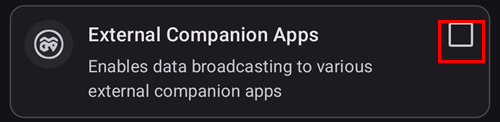
AAPS can broadcast its status to other apps installed on the same phone: glucose and trend, IOB, COB, basal and temp basal, profile name, loop status, phone and pump battery, reservoir level and bolus progress. Several watch companion apps read this broadcast and display the data on watches that AAPS does not support directly. To send the data, enable External Companion Apps in Configuration > Communication (see External Companion Apps on the Configuration page). The broadcast is sent with each new reading and cannot be requested: a refresh button in the companion app has no effect on AAPS.
Companion apps known to use this broadcast:
WatchDrip+ for Xiaomi and Amazfit watches, see Xiaomi and Amazfit watches below.
GlucoDataHandler for Wear OS watches, as a complication or a widget. It is a useful fallback on Wear OS versions where the AAPS watchfaces are unreliable, see Set up AAPS on your Wear OS watch. Its companion app GlucoDataAuto shows the same data in a car with Android Auto.
G-Watch app for Samsung Tizen watches, and its later Wear OS port. In earlier AAPS versions the plugin was named Samsung Tizen after this app.
Предупреждение
The G-Watch app and its Wear OS port are no longer maintained, and Samsung has moved its smartwatches from Tizen to Wear OS. G-Watch is only relevant for existing, older setups and is not recommended for a new installation. Check the dedicated Facebook group for the latest news.
Garmin
There are some watch faces for Garmin that integrate with AAPS, on the Garmin ConnectIQ store.

AAPS Glucose Watch integrates directly with AAPS. It shows loop status data (insulin on board, temporary basal) in addition to glucose readings and sends heart rate readings to AAPS. It is available in the ConnectIQ store; enable the Garmin plugin in Configuration → Communication. 
Highest and lowest glucose values on the graph
Glucose change per minute
Insulin on board (IOB)
Time since the last glucose reading (minutes:seconds)
Temporary basal rate, as a percentage of the profile basal rate
Glucose graph of the last 2 hours
Current glucose value
Fitbit
Предупреждение
Google is moving Fitbit into Google Health and is removing third-party apps and watch faces from Fitbit watches in the EU. Fitbit watchfaces are therefore no longer a recommended option, and buying a Fitbit for use with AAPS is not recommended.
For existing Fitbit watches, the Nightscout webpages list some monitoring-only options, such as Glance. These are third-party watchfaces too, so the same EU restriction applies.
Following only
These smartwatches will reflect some AAPS information, some will require other apps.
Существует множество доступных смарт-часов, которые дают только отображение ГК. Если вы пользуетесь сайтом Nightscout, то хороший обзор вариантов дан здесь
Here below some of the follow-only watch options popular with AAPS users:
Xiaomi and Amazfit watches
WatchDrip+ is a community-developed companion app that displays glucose and loop data on various smartwatch models, mostly Xiaomi (e.g. Mi Band) and Amazfit brands:

Since version 0.5, WatchDrip+ reads its data directly from AAPS, without xDrip+ as a relay. On the AAPS phone:
Enable External Companion Apps in Configuration > Communication, see above. It provides the current glucose, delta, trend arrow, IOB and pump status.
Enable the xDrip plugin in Configuration > Communication and turn on Send status to xDrip+ in its settings. It provides the IOB/COB status line, and the glucose graph on the watch fills in after a few readings.
If xDrip+ is installed on the phone, disable its Broadcast Service API (xDrip+ > Settings > Inter-app settings) so that the watch does not receive the data twice. If xDrip+ was only relaying data to the watch, you can uninstall it.
The refresh button of WatchDrip+ has no effect with AAPS: the data arrives with each new reading.
You can read more about them, including how to set them up, on the WatchDrip+ website. The advantage of these watches is that they are small and relatively affordable. Они особенно популярны как часы для детей и людей с небольшими запястьями.
Pebble watch


Pebble watches (now discontinued) were on general sale from 2013 to 2016, and may still be available second-hand. Активы Pebble перешли к Fitbit. Пользователи Pebble могут пользоваться циферблатом Urchin для просмотра данных Nightscout. Отображаемые данные включают активный инсулин IOB, действующий временный базал и прогнозирование. If open looping you can use IFTTT to create an applet that says if a Notification has been received from AAPS then send either an SMS or pushover notification.
Bluejay watches
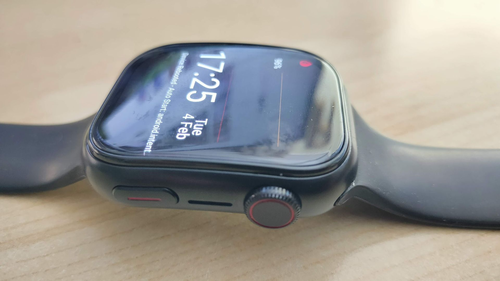
These are unique pieces of technology which can receive glucose data directly from the Dexcom transmitter. It is not widely known that Dexcom G6/G7 transmitters actually broadcast the current glucose data on two separate channels, a phone channel and a medical channel. The Bluejay watches can be set to receive glucose data on either channel, so if AAPS is using the phone channel, then the Bluejay watches can use the medical channel.
The key advantage is that the watch is independent of both the phone and the looping system. So, for example, if you disconnect the pump and the AAPS phone at the beach or theme park, and are out of range of the AAPS phone, you can still get readings from your Dexcom directly to the Bluejay watch.
The original Bluejay GTS is discontinued and cannot read the Dexcom G7. The later models (U1, then the current U3, sold as early access at the time of writing) are full Android watches running xDrip, which collect from the Dexcom G6 and G7 directly. The vendor describes the watch as a research tool, not for medical use. Reported disadvantages are that it does not always pick up a reading every 5 minutes and that the battery needs frequent charging. Check the Bluejay website for the current model and availability.
Apple watch
Check Nightscout on your watch.
The Apple watch now supports G7 direct connection and can be used simultaneously with AAPS.